 Activix
 AutoTrader
 Black Book
 CarGurus
 Equifax
 TransUnion


Automotive Lead Management
Know which leads
to work first
Your CRM tracks leads. It can't tell you which ones can buy. AVA® qualifies every lead with a soft credit pull, tags it by buyer type, starts the conversation by SMS and puts the full profile in front of your team.
What is automotive lead management?
Automotive lead management is everything between a lead arriving and a deal closing: qualifying it, getting it to the right person, following up fast and keeping the record straight in your CRM. Most stores do that with contact details alone. AVA® adds credit data at the front, so your team decides who to call first based on who can buy.
- JB Jordan Blake 2024 CX-5 Running soft pull Reading credit file Prime Sales
- MR Marcus Reid 2021 F-150 Running soft pull Reading credit file Subprime Finance
- PN Priya Nair 2023 Civic Running soft pull Reading credit file Newcomer Newcomer desk
- SO Sam Okafor 2022 Tiguan Running soft pull Reading credit file Neg Equity Finance
- EF Elena Fortin 2025 RAV4 Running soft pull Reading credit file Prime Sales
Tagged by buyer type
Each lead is flagged as Prime, Subprime, Newcomer or Negative Equity the moment it qualifies.
Sent to the right person
Prime to sales, subprime to finance and newcomers to the right programs.
Texted in seconds
A personalized SMS with the shopper's qualification results goes out before your rep sees the notification.
Delivered to your CRM
Qualified leads are pushed to your CRM through ADF, with source and campaign data attached.
Lead management your team can read at a glance
One lead record with credit, trade and ID
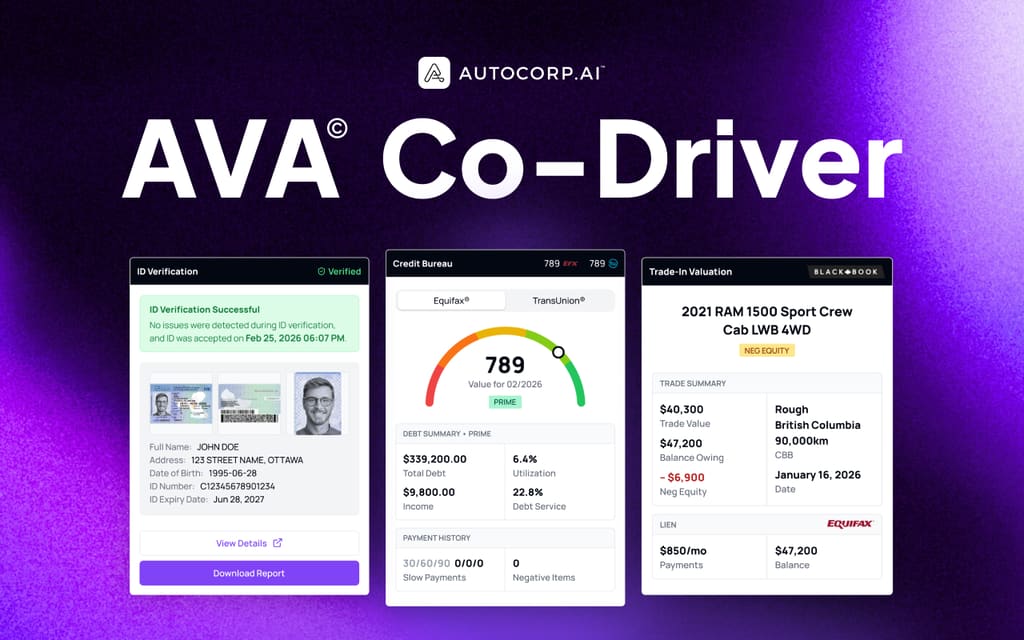
Open a lead in AVA® Portal and the whole picture is there: the credit overview with score, payment history, debt utilization and current obligations, the trade value and lien, and ID verification status.
- Credit tier and payment range on every qualified lead
- Canadian Black Book trade value with lien and equity
- Co-Driver shows the same profile beside your CRM or desking tool

Tags that say who can buy
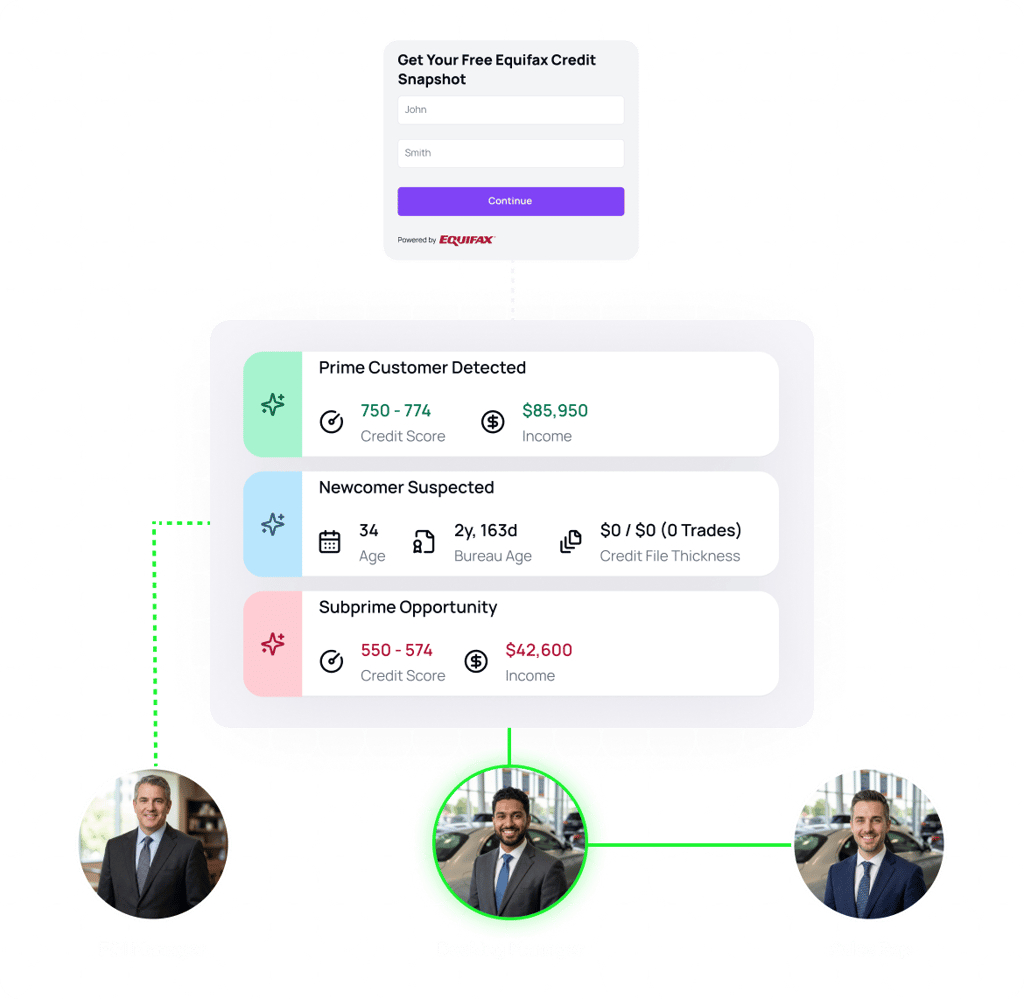
Every record carries a credit tag such as Prime, Subprime or Negative Equity. Your team sorts a list by who can buy today, and campaigns can include or exclude prospects one at a time.
- Prime, subprime and negative equity flags on every record
- Filter by credit score range, income and ID verification status
- Tags come from the soft pull the shopper completed

Credit, trade and ID leads, counted separately
A shopper can come in through a credit check, a trade-in valuation, an ID verification or an appointment. AVA® keeps each lead type distinct, so you see what is driving the month and who should be notified.
- Credit apps, trade apps, appointments and ID verifications
- Notifications set by product or lead type
- Monthly totals for each type across your stores

Detect the buyer type, route to the right person
AVA® reads the credit file, classifies the lead as Prime, Subprime, Newcomer or Negative Equity and routes it to the right team member. A subprime shopper reaches someone who works subprime deals every day.
- Routing by product and team
- QR poster leads go to the rep assigned to that poster
- A personalized SMS goes to the shopper within seconds
Lead management with and without credit data
| CRM alone | CRM with AVA® | |
|---|---|---|
| Prioritizing | Newest lead first, or a rep's best guess | Credit tier and buying power on every qualified lead |
| Routing | Round robin or first available rep | By buyer type: prime to sales, subprime to finance |
| Follow-up | Depends on who is free | Automated SMS sequences that stop when the shopper replies |
| Conversations | Spread across reps' phones | One shared inbox, so any rep can take over with the full history |
| At the desk | Re-keying data and pulling credit again | Co-Driver shows the existing profile inside your CRM or desking tool |
How AVA® manages a lead
-
The lead arrives
From your website, a marketplace listing, an OEM program, a QR code or a campaign to your own database.
-
AVA® qualifies it
The shopper completes a soft-pull credit check on their own phone. You get their credit tier, a payment range and trade details.
-
AVA® tags, routes and texts
The lead is tagged by buyer type, sent to the right person and texted with their results within seconds.
-
Your team works it where they already are
The profile sits in AVA® Portal and your CRM, and Co-Driver brings it up automatically when a rep opens the customer.
What your team uses to manage leads
Automotive lead management, answered
What sales managers and BDC leads ask first.
What is automotive lead management?
Is AVA® a CRM?
How fast does AVA® respond to a new lead?
How does AVA® decide who gets a lead?
Does my team have to log into another system?
Can the BDC share conversations?
See how AVA® manages a lead
15 minutes. A working demo, from the moment a lead arrives to the profile in your CRM.