 Activix
  AutoTrader
  Black Book
  CarGurus
  Equifax
  TransUnion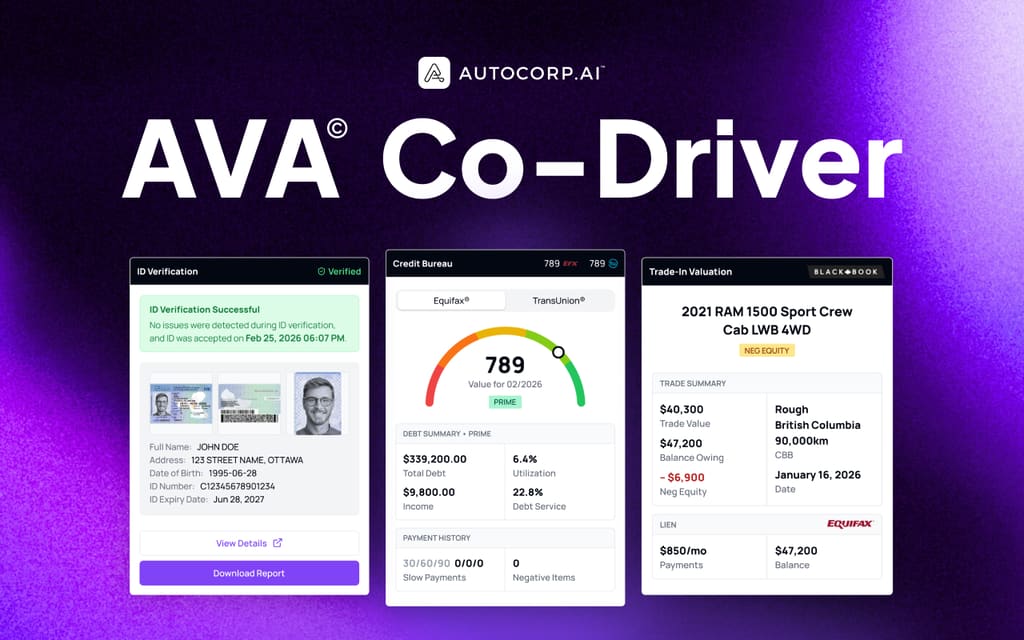


.png)
We have some exciting new updates at AVA® designed to help dealerships work faster, reduce manual tasks, and get more value from the tools their teams already use.
From new lead controls in AVA® Co-Driver to customizable VeriDrive booking hours, these updates give dealership teams more control without adding unnecessary steps to their workflow.
Key Takeaways
- AVA® Co-Driver now lets dealers assign leads and update lead statuses directly from the browser extension.
- Lead controls can be enabled or disabled at the dealership level.
- Dealers can use Co-Driver to quickly autofill AVA® lead information into new finance applications.
- VeriDrive now lets dealerships customize their test-drive hours, appointment lengths, and operating days.
- Booking times automatically reflect the dealership's selected timezone and availability.
- These updates are designed to keep more dealership workflows within the tools teams already use.
Co-Driver: Assign & Update Leads Without Leaving Your Workflow
Dealership teams can now update lead statuses and assign leads directly from the AVA® Co-Driver Chrome extension.
Previously, dealers who wanted to update a lead or assign it to another team member would need to switch over to their CRM or another platform. With the new lead controls, dealerships that use AVA® as part of their lead management workflow can handle these actions directly inside Co-Driver.
How It Works
This feature is disabled by default and can be configured at the dealership level.
An administrator can enable it by going to:
Settings → Account → Leads → “Show lead controls in Co-Driver”
Once enabled, dealership users will see a Status dropdown and Assign picker on both the leads list and individual lead profiles inside Co-Driver.
The available status options match the AVA® Portal, and updates remain synchronized between Co-Driver and the Portal.
This gives dealerships another way to manage leads without constantly switching between platforms.
.png)
Why It Matters
For dealerships that use AVA® as part of their lead management process, small workflow interruptions can add up quickly.
With lead controls available directly in Co-Driver, teams can:
- Update lead statuses without leaving Co-Driver
- Assign leads directly to team members
- Manage leads from the lead list or individual lead profile
- Keep lead information synchronized with the AVA® Portal
VeriDrive: Customize Your Dealership's Test Drive Hours
Dealerships using VeriDrive now have more control over when customers can book test drives.
Previously, test-drive availability followed a fixed 9 AM–5 PM schedule. Dealers can now configure their own availability to better reflect their actual operating hours.
How It Works
Company administrators can access a new Settings → Account → Appointment page to configure:
- Dealership timezone
- Appointment length, including 30- or 60-minute appointments
- Opening and closing hours for each day
- Breaks during the day
- Additional time windows
- Days when the dealership is fully closed
Soft-pull credit, trade equity, and verified ID for dealerships. Take a quick tour.
Book a demo →Once the settings are saved, the Appointment widget updates automatically.
Customers will see available appointment times based on the dealership's actual schedule and timezone. Confirmation messages and calendar invitations will also reflect the configured availability.
.png)
More Flexibility for Dealerships
Every dealership operates differently. Some stores are open late, some have midday breaks, and others have different hours throughout the week.
Customizable VeriDrive hours make it easier for dealerships to offer online test-drive booking without forcing their teams to work around a one-size-fits-all schedule.
Built Around How Dealerships Actually Work
These updates share a common goal: reduce unnecessary steps for dealership teams.
Whether a manager is assigning a lead, transferring customer information into a finance application, or configuring test-drive availability, AVA® continues to focus on making dealership workflows faster and easier to manage.
With Co-Driver bringing more functionality directly into the browser and VeriDrive giving dealerships more control over their booking process, these improvements help teams spend less time managing software and more time working with customers.
Frequently Asked Questions
What is AVA® Co-Driver?
AVA® Co-Driver is a browser extension that surfaces AVA® customer data while dealership teams work in their CRM, desking, and other supported software. It helps teams access customer information without constantly switching between platforms.
Can dealers update lead statuses in Co-Driver?
Yes. Dealerships can enable the “Show lead controls in Co-Driver” setting, which allows users to update lead statuses and assign leads directly from Co-Driver.
Is the lead controls feature enabled automatically?
No. The feature is disabled by default and must be enabled by a dealership administrator through the AVA® Portal settings.
Can dealerships customize their VeriDrive test-drive hours?
Yes. Dealership administrators can configure their timezone, appointment length, opening and closing hours, breaks, additional time windows, and closed days.
Do customers see the dealership's actual availability?
Yes. Once the dealership saves its VeriDrive settings, the booking widget reflects the configured availability, including the dealership's timezone and available appointment times.
More Updates Are Coming
These improvements are part of our ongoing work to make AVA® more useful across the dealership, from lead management and desking to test-drive booking.
Want to see what AVA® can do for your dealership? Learn more about AVA® and book a demo with our team.
.png)