 Activix
  AutoTrader
  Black Book
  CarGurus
  Equifax
  TransUnion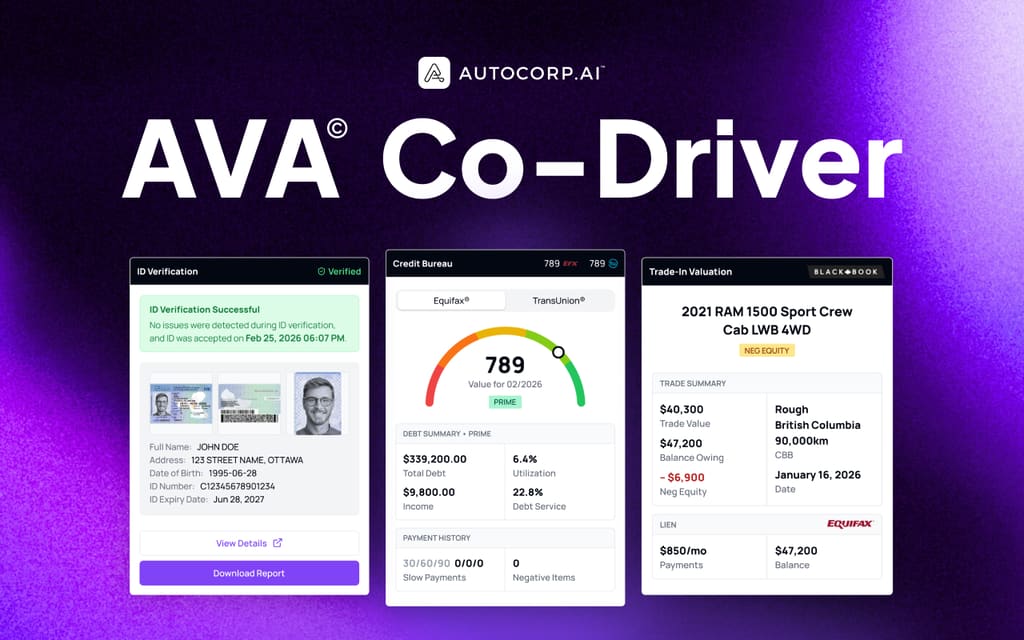



Used inventory is the tightest it's been in years, and auction lanes are punishing. If you're a Sales or Ops Manager, sourcing units off the street from your own database is no longer a nice-to-have. It's the difference between a full lot and a lost quarter.
The problem is that most dealerships treat trade-ins as something that happens at the desk, after a customer has already picked a car. By that point you're negotiating against a number the customer Googled on a competitor's site three weeks ago.
In our experience working with 650+ dealerships across North America, there are 4 things a dealership needs to nail if it wants customers to actually raise their hand and sell you their car:
1. Give customers a reason to share their trade info before they walk in
Nobody fills out a form for no reason. The trade tool has to feel useful to the shopper, not like a lead trap. They want to know what their car is worth today, in their region, without a salesperson calling them six times.
To do that, you need a website tool that returns a real, market-backed value in seconds, not a "we'll call you with your quote" placeholder.
2. The number they see has to be trustworthy
If the value looks made up, the customer bounces and calls the dealer down the street. Worse, if you show them a wildly inflated number to capture the lead, you burn trust when the appraiser walks the car.
From our experience, shoppers remember whether the number felt fair long after they've forgotten which dealership captured them. A good trade tool should pull from a source the customer already trusts (in Canada, that's Canadian Black Book) and show a range tied to condition and region, not a single fantasy figure.
3. You need a way to push trade requests to your existing database
The website widget handles inbound curiosity. But most of your trade opportunities are sitting in your CRM already: past customers 30-40 months into a 60-month loan, service customers with equity, sold-not-delivered leads from six months ago.
A good trade acquisition system should let you fire a personalized SMS to a segment of those contacts with a one-tap link that drops them straight into the trade widget, pre-filled where possible.
4. Trade data should flow into the same lead record as credit, ID, and inventory
Yes, this post is about getting trades. But a trade value on its own doesn't sell a car. If a shopper tells you their 2021 RAM 1500 is worth $40K but they owe $47K, you need to see that negative equity next to their credit tier and know which unit on your lot can absorb it.
Otherwise your BDC hands off a "hot trade lead" to a salesperson who has to re-qualify from scratch, and the customer feels the friction.
After years of building software for dealers (and running dealer operations ourselves), we built AVA® to hit all four of these. The trade tool inside AVA® is, honestly, our highest-converting widget. It typically pulls more leads than the credit tool, because "what's my car worth" is a lower-commitment question than "check my credit."
Here's how each piece works.
1. AVA® Trade: A Website Widget Customers Actually Complete
We built AVA® Trade as a lightweight form that lives directly on your dealership's website (and any landing page you want to run). The customer enters their year, make, model, trim, mileage, and condition, and gets a Canadian Black Book value on the screen. No callback required.
Under the hood, it pushes the lead into your AVA® Portal, formats it as an ADF, and drops it into your CRM.
The Trade Valuation form sits alongside Credit Application and Book Test Drive in your Website channel. Copy the shareable link, or embed the widget on your site.
For example, say a shopper is browsing your used inventory at 10 PM on a Tuesday. They click "Value My Trade," fill out the widget in about 90 seconds, and get a range on screen. That lead lands in your Leads dashboard by morning with the trade already appraised, so your BDC is calling to book an appraisal appointment, not to ask for the trade info.
That's simple. But what about the shopper who wants to know exactly what you'll pay them?
The AVA® Portal shows the full Canadian Black Book breakdown on the lead's Trade tab. Your team can see:
- Wholesale value by condition → X-Clean, Clean, and Average columns
- Base value → the CBB starting point for that year/make/model/trim
- Regional adjustments → because a RAM 1500 in Alberta isn't worth what it is in PEI
- Mileage adjustments → tied to the odometer the customer entered
- A refresh button → so you can pull the latest data right before the customer arrives
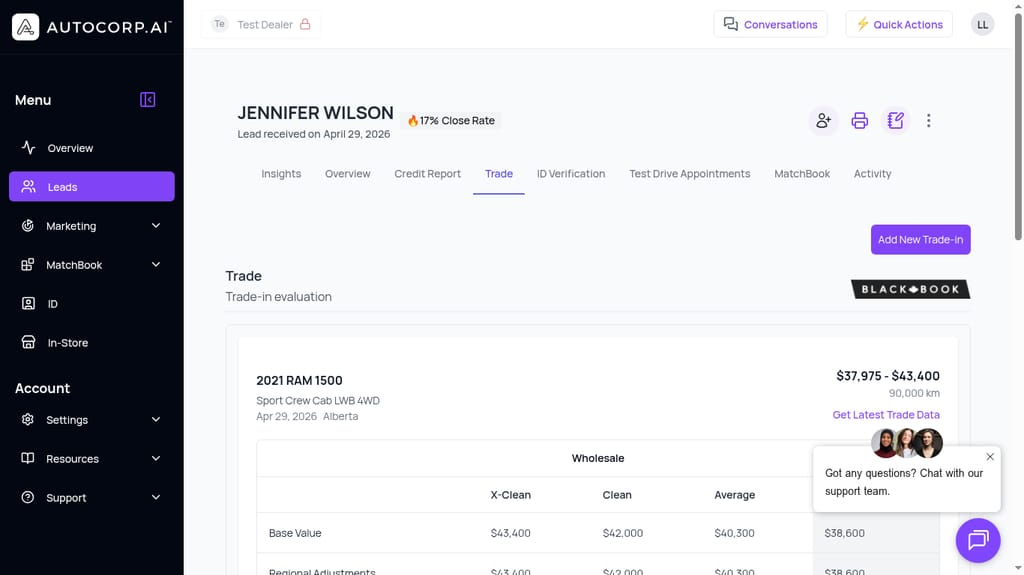
A 2021 RAM 1500 Sport Crew Cab valued at $37,975–$43,400 wholesale, pulled from Canadian Black Book with regional adjustments for Alberta.
For many dealerships, if a customer asked "what will you actually give me," the answer is "bring it in and we'll take a look" — which loses about half of them right there. In AVA®, your salesperson can quote a defensible range on the phone because the number came from CBB, not from a used car manager's gut feel.
2. Trust Baked Into the Number (Powered by Canadian Black Book)
AVA® révèle le crédit par consultation douce, la valeur d'échange et l'identité vérifiée sur chaque prospect. Faites la visite guidée.
Réserver une démo →We've talked to a lot of used vehicle managers. The consistent piece of feedback is that when a trade tool shows a made-up "high number to capture the lead," the appraisal conversation goes sideways fast. The customer arrives expecting $22,000 and hears $16,500, and the deal dies before the test drive.
Instead, dealers want a tool that:
- Pulls from a source the customer already recognizes. In Canada, that's Canadian Black Book. When shoppers see the BLACK BOOK badge on the valuation, they don't argue with the number the way they argue with a random online quote.
- Shows a range, not a single number. X-Clean, Clean, and Average gives the customer a realistic frame and gives your appraiser room to land honestly on condition.
- Adjusts for the customer's region and mileage. A generic national average is easy to disprove. A number tied to the customer's province and odometer holds up.
Per the below screenshot, AVA® stamps every trade with a Black Book badge, the region, the odometer, and a live valuation range. Nothing about it feels like a bait number.
Every AVA® Trade record shows the Black Book source, the region (Alberta), the odometer (90,000 km), and a wholesale range broken down by condition.
You can also click "Get Latest Trade Data" right before the appointment to refresh the value. Prices move. A number pulled three weeks ago at initial submission isn't the number you want to appraise against on delivery day.
3. Campaigns SMS: Push Trade Offers to the Database You Already Own
Here's where a lot of dealers leave money on the table. Your website tool catches the shoppers who show up on their own. But the biggest trade pool is your existing database — service customers, past sales, lost leads.
Most dealers export a CSV, send it to a mailhouse, wait ten days, and get a 0.5% response. By the time anyone calls, the customer has already been to the manufacturer's site.
With AVA® Campaigns, you can build a segmented SMS campaign that drops the trade valuation link directly into a customer's text messages, in a few clicks.
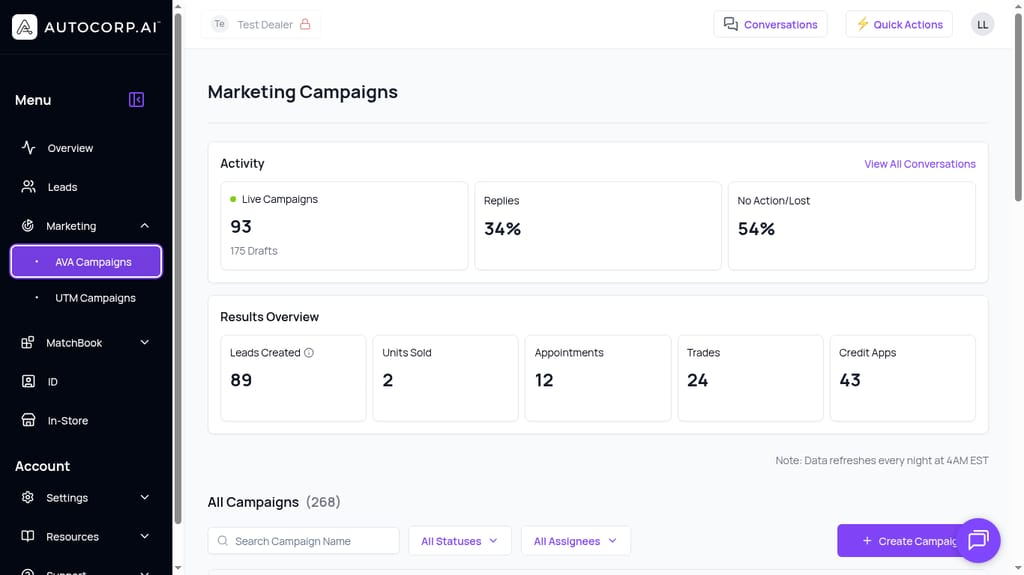
The Marketing Campaigns dashboard tracks Leads Created, Appointments, Trades, and Credit Apps generated by each SMS campaign. Reply rates and no-action rates surface at the top so you can kill or scale campaigns fast.
For example, say you want to source clean 2019-2022 half-ton pickups because your lot is thin on trucks. You'd build a campaign that targets:
- Vehicle type → past buyers of pickup trucks
- Age of loan → 30-48 months into their term (usually where equity starts)
- Region → your local market
- Do-not-contact status → auto-filtered out
- Message content → "Hey [Name], we're paying above-market for 2019-2022 pickups this month. Want to see what yours is worth? [trade link]"
The link drops them straight into your AVA® Trade widget. They get a real Black Book number in 90 seconds, and that response comes back into your Conversations inbox as a live SMS thread. Your team picks up the reply and books the appointment.
This is what the data looks like once campaigns are running. In the screenshot above, one dealer's account shows 24 trades and 43 credit apps generated in a single reporting window from AVA® Campaigns activity. The reply rate on trade-focused SMS is consistently higher than credit-focused SMS, because people are more comfortable answering "what's my car worth" than "can I see your credit."
You're not doing equity mining. You're doing acquisition.
4. Every Trade Lead Comes With Credit, ID, and Inventory Attached (No External Tools)
Yes, you came to this post to figure out how to get customers to sell you their cars. That's step one.
But a trade lead is only useful if you can act on it. If the customer has $6,000 of negative equity and a 640 credit tier, you don't want to find that out on delivery day. You want to know it before you commit to a number.
Now, you might wonder — can't I just check the customer's credit separately once the trade lead comes in? Yes, but that means two calls, two forms, and two chances for the customer to ghost. It also means your BDC is looking at trade data in one system and credit data in another.
With AVA®, the trade lives on the same lead record as credit, ID verification, and MatchBook. Per the screenshot below, your Leads dashboard shows the customer's name, credit range (from Equifax), and trade-in value side by side, along with tags like PRIME or NEGATIVE EQUITY so your team knows at a glance which leads are ready for the phone.
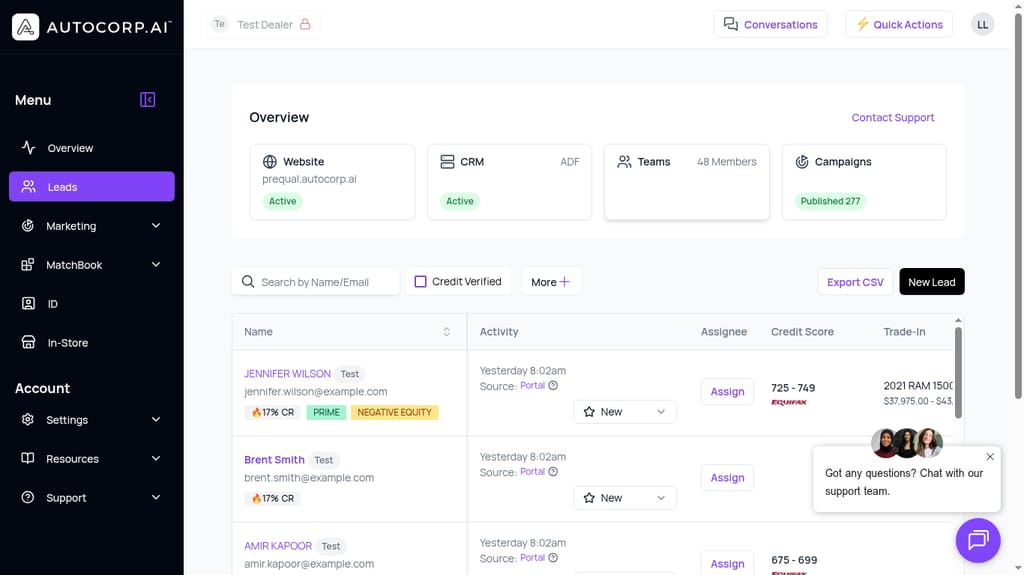
Jennifer Wilson: 725-749 Equifax credit, 2021 RAM 1500 trade valued at $37,975+, tagged PRIME and NEGATIVE EQUITY. Everything a salesperson needs to plan the first call, on one line.
From here you can click into the lead and jump between the Credit Report tab, the Trade tab, the ID Verification tab, and MatchBook. If the customer has negative equity, MatchBook can pull inventory that will absorb the shortfall inside the deal, so your salesperson isn't guessing which unit works.
That's the difference between "we got a trade lead" and "we got a deal."
See AVA® Trade in Your Dealership
If your team is spending too much time chasing trades that never materialize, or missing the equity sitting in your own database, book a demo and we'll walk you through how AVA® Trade and AVA® Campaigns work together on your website and in your CRM.
You can also see how AVA® Trade fits into the broader Credit-Qualified Lead framework on our Marketing Teams page, or compare plans on our pricing page — the website trade tool is included with AVA® Growth.