 Activix
  AutoTrader
  Black Book
  CarGurus
  Equifax
  TransUnion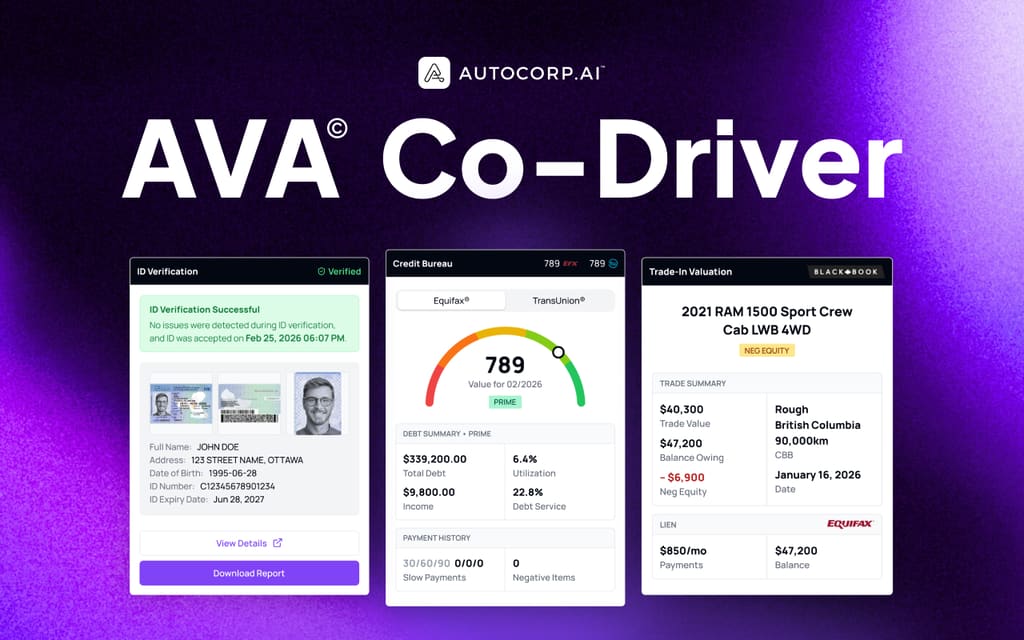



If you're a dealer principal, sales director, BDC leader, or F&I manager shortlisting software right now, you've probably noticed that most "lead management" pitches sound identical. More leads. Faster follow-up. Better conversion. The problem is that none of that matters if the leads your team is chasing can't actually be matched to a vehicle you have on the lot that they can actually finance.
That's the shift we've watched happen over the last two years. The dealers pulling ahead aren't the ones with the biggest lead volume. They're the ones whose reps can walk into a first call already knowing three things: what the customer can afford, what's on the lot that fits, and whether the deal can be structured around a trade or negative equity. That's what inventory matching — done properly — actually unlocks.
In our experience working with 650+ dealerships across North America, there are four factors that matter when you're choosing an automotive lead management platform with inventory matching:
1. The platform qualifies buying power, not just contact info
A lead with a name, phone number, and "I'm interested in the RAM 1500" tells your BDC almost nothing. Is this a prime buyer at 740, or a subprime shopper at 560 who needs a specialized program? Are they payment-bound at $500/month or looking at $900? Without that signal, every follow-up is a guess.
To match inventory in a way that leads to a sale, you need credit and income data on the lead before the first call — ideally from a soft pull that doesn't spook the customer or hit their score. If the platform can't do that, it isn't matching inventory. It's just filtering it.
2. The inventory data behind the match is fresh and status-accurate
Most sales managers we talk to have been burned by this. A rep presents three "matches" from a tool, the customer gets excited about unit #2, and it turns out that vehicle sold four days ago or is still in transit. Trust collapses immediately, and the rep stops using the tool.
From our experience running dealer floors, salespeople remember the one time a tool embarrassed them in front of a customer far longer than they remember the ten times it helped. A good lead management platform should show you exactly what's in stock, what's out of stock, what's on order, and — critically — when the inventory last synced from your DMS. If there's no "Last Sync" timestamp visible, assume the data is stale.
3. The matching engine handles real deal-structure constraints (including negative equity and subprime)
Filtering inventory by year/make/model is easy. That's not matching — that's a website.
But what if the lead is a customer who owes $47,200 on a trade worth $40,300, has a 560 credit score, and can only afford $525/month? That's the reality of a huge chunk of your walk-in and internet traffic. Most tools force the rep to export inventory to a spreadsheet, manually estimate payments against three or four lender programs, and hope the math works.
A good lead management platform should pre-compute lender-qualified deal structures on each in-stock unit — payment, term, APR, frontend profit, backend room — so the rep can present options that are financeable, not aspirational. It should also flag deal-killers (like $6,900 in negative equity) before the appointment, not during F&I.
4. Matching fits inside the BDC → Sales → F&I workflow, without adding another tool
Yes, this post is focused on inventory matching. But a good platform should also handle the surrounding workflow: credit qualification, ID verification, trade valuation, test drive booking, and reporting that ties matching activity back to units sold.
Why? Because your BDC agent, your salesperson, and your F&I manager all need the same customer picture to move the deal forward. If matching lives in one tool, credit in another, ID in a third, and trade in a fourth, the customer waits while your team re-keys data — and lenders reject applications because the numbers don't line up across systems.
Now, you may wonder: "We already have a CRM and a website inventory tool. Do we really need another platform?" It's a fair question. But most CRMs store leads and most inventory tools display vehicles. Neither one qualifies buying power or connects the two. The reason to consolidate isn't to replace your CRM — it's to feed it lead records that are already dealable.
After years working directly with dealer principals and sales teams, we built AVA® to handle all four factors above. Below, we'll walk through how each capability works in the product, with screenshots from the actual portal.
1. Credit-Qualified Leads: Buying Power on Every Lead Before the First Call
We designed AVA® around a simple idea: credit is the earliest and most reliable signal of who's actually going to buy. Every lead that enters your AVA® Portal — whether from your prequal website, an SMS campaign, a marketplace, or a manual entry — gets a soft-pull credit snapshot from Equifax, a credit tier tag (PRIME, SUBPRIME, NEWCOMER), and any trade or equity signals the customer shared.
Your Leads dashboard then surfaces all of that at a glance, so a BDC lead can prioritize the queue in seconds instead of dialing top-to-bottom.
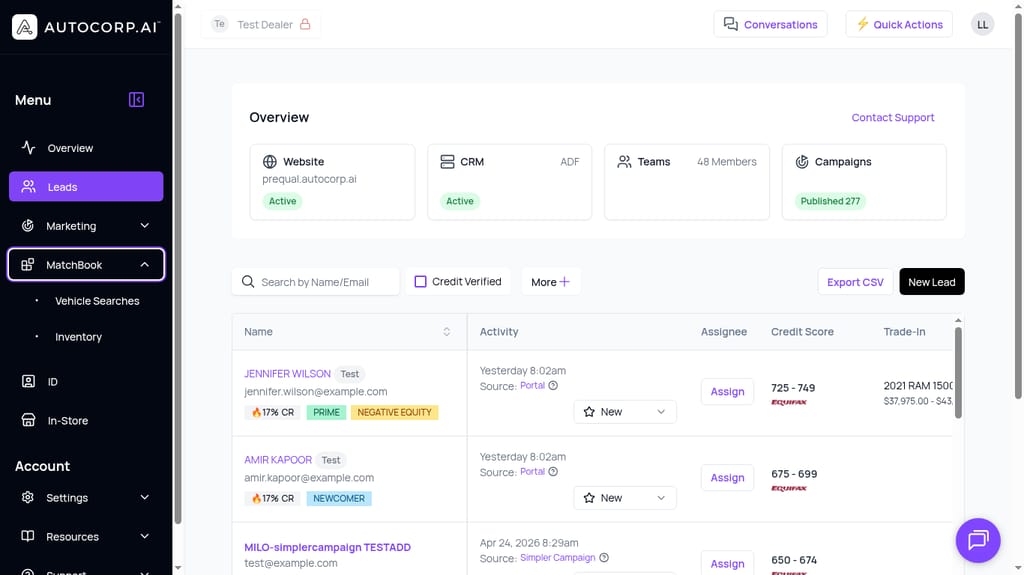
For example, say a BDC agent starts their morning shift and needs to figure out which of 40 overnight leads to call first.
They filter the Leads list by "Credit Verified," sort by credit tier, and immediately see Jennifer Wilson — a PRIME 725–749 lead with a 2021 RAM 1500 trade worth $37,975. That's a call you make in the first 15 minutes. Compare that to a name-only lead from a third-party site with no credit signal at all.
That's the simple case. But what about a subprime lead where the whole deal hinges on finding the right unit at the right payment?
For example, take Alex Johnson — a lead with a 550–574 credit score and $2,900 monthly income. That's not a lead you throw away; it's a lead you handle differently. AVA®'s Lead Insights (BETA) tab automatically detects this as a Subprime Opportunity and walks the rep through a 4-step roadmap:
- Secure Pre-Approval → Pull the lender program the customer will actually qualify for.
- Match Inventory → Feed those approval terms into MatchBook to find vehicles that fit the paycall.
- Present Options → Show the customer 2–3 real units with real payments (not "starting from").
- Structure the Sale → Lock in a deal the lender will fund the first time.
Selecting the right unit for a subprime deal used to take a rep an hour of back-and-forth with the desk. In AVA®, it takes a few clicks.
This matters for two reasons: (1) your BDC stops wasting outreach on leads with no realistic path to funding, and (2) your salespeople walk into every conversation already knowing what the customer can afford.
For many sales teams, if a subprime customer walks in and asks "what can I get for $450 a month?", the honest answer is "hang on, let me talk to the desk" — and then twenty minutes of paper flipping. In AVA®, the rep can answer live, on the first call, from the Lead Insights view.
2. In-Stock, Sync-Verified Inventory Matching (So Your Reps Actually Trust the Tool)
The fastest way to kill adoption of any inventory tool is to show a rep a vehicle that isn't really there. We designed the MatchBook Inventory view to make status impossible to miss.
Every time a rep opens Inventory, four status chips appear at the top of the screen: In Stock, Out of Stock, On Order, and Last Sync. That last one is the trust anchor — it tells the rep exactly how recent the data is (in the screenshot below, 29 minutes ago), so nobody's presenting a phantom vehicle from last Tuesday.
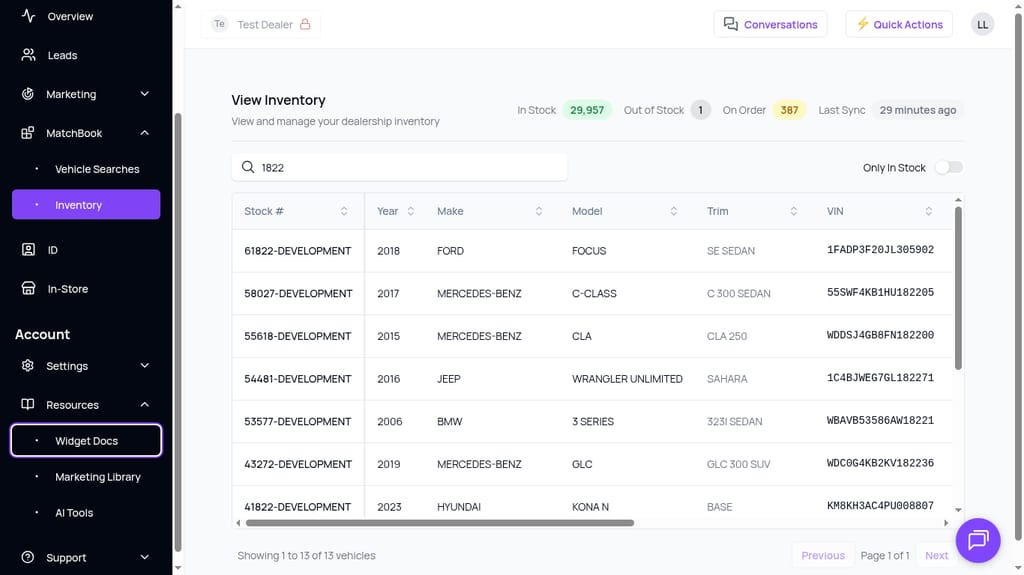
From that experience running BDC and sales floors, we've found that when it comes to inventory matching, the majority of reps don't want a giant dashboard with 15 dropdowns. They want fast answers to three questions:
AVA® reads credit, trade, and ID data and delivers it right where your team works. Take the tour.
Book a demo →- Is this vehicle actually on my lot right now? (In Stock vs. Out of Stock vs. On Order)
- How recent is this data? (Last Sync timestamp — critical when reps are on a live call)
- What are the specs and stock number so I can find it? (Year, Make, Model, Trim, VIN, Stock #)
Per the screenshot above, AVA®'s Inventory view answers all three at a glance. Reps can search by stock number, VIN, or free text; toggle "Only In Stock" on to hide anything they can't sell today; and sort every column.
The DMS/PBS integration keeps data flowing automatically — it's included on every plan, so there's no manual CSV upload or nightly export ritual to maintain.
Additional layer: Vehicle-to-lender matching inside MatchBook
Inventory freshness is table stakes. The next layer is turning a raw list of in-stock vehicles into ranked, lender-approved deal options. MatchBook does that by combining your inventory feed with the customer's lender approvals (imported directly from Dealertrack) and pre-computing the numbers on every unit.
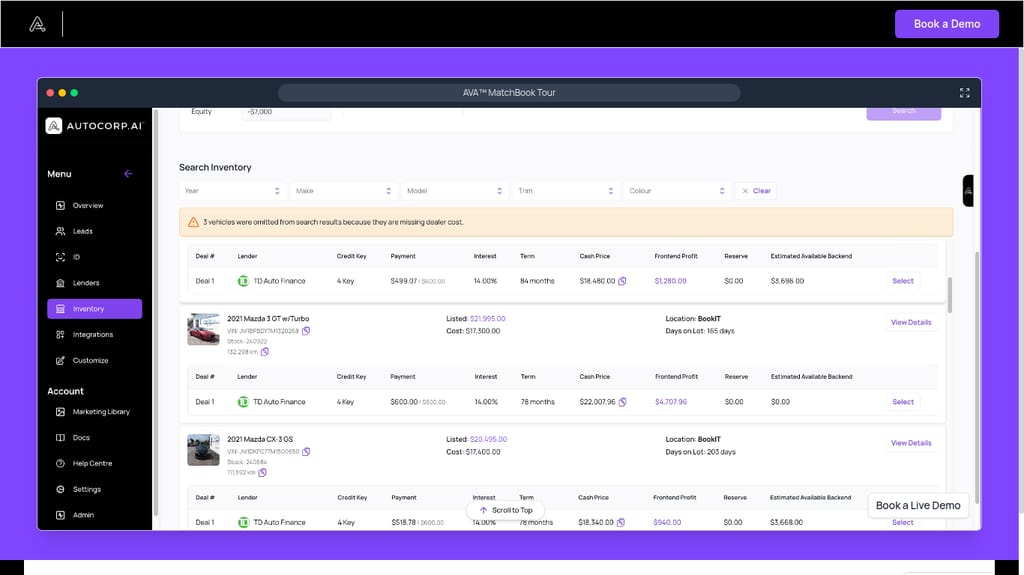
For each vehicle, MatchBook shows the rep:
- Lender and credit key
- Monthly payment (against the customer's target)
- Interest rate and term
- Cash price
- Frontend profit
- Reserve
- Estimated available backend
Notice the banner in the screenshot: "3 vehicles were omitted from search results because they are missing dealer cost." That's the platform protecting your desk from bad math — if a unit doesn't have dealer cost loaded, MatchBook won't calculate a fake profit number. Reps see only deals they can trust.
Again, this ranked deal list can be built in a few clicks, and it re-computes automatically as inventory syncs and approvals update.
3. Deal-Structure-Aware Matching for Trade-Heavy and Negative-Equity Customers (All Inside AVA®, Without Needing External Tools)
From our experience, the majority of dealership reps are fine matching inventory for a clean deal — cash buyer, positive equity, prime credit. That's a straightforward case.
But what if one of your salespeople gets this scenario: "The customer loves the 2023 Silverado, but they owe $47,200 on a trade worth $40,300, they're payment-sensitive at $600/month, and their credit is 725. Which of our units can absorb the negative equity and still cash-flow the lender?"
That question used to require exporting inventory to Excel, pulling payoff and trade values from a separate tool, opening a payment calculator, and running four or five scenarios against different lender programs. Twenty minutes minimum, and usually more like an hour if the desk manager is busy.
In AVA®, it happens automatically the moment the trade is entered. The Insights tab flags negative equity, quantifies the gap, and links the rep straight to MatchBook.
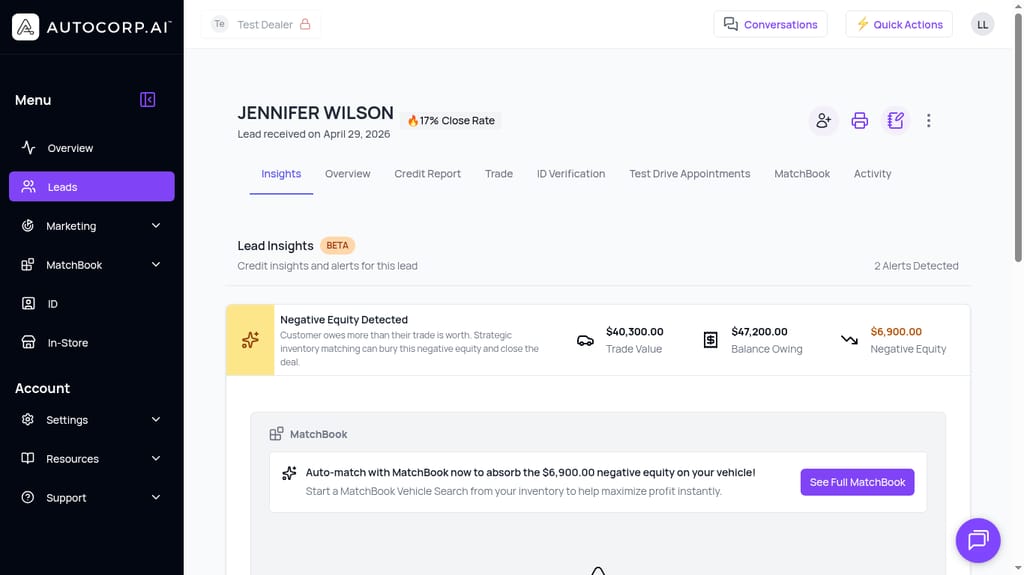
The way the negative equity workflow works is simple. Per the screenshot, AVA® calculates:
- Trade Value: $40,300.00
- Balance Owing: $47,200.00
- Negative Equity: –$6,900.00
Then it prompts the rep directly: "Auto-match with MatchBook now to absorb the $6,900.00 negative equity on your vehicle." One click on See Full MatchBook launches an inventory search pre-filtered for units with enough frontend margin and backend room to bury that $6,900 without blowing up the customer's payment.
Another example is the subprime paycall scenario we mentioned earlier — where the lender dictates the maximum payment and interest rate. MatchBook filters the in-stock inventory to only vehicles where the lender-approved payment matches what the customer can afford, so the rep never shows a unit that will get kicked back at funding.
These use cases matter because they're the deals that make or break a month. Subprime and negative-equity customers aren't edge cases — for most dealers they're 30–50% of the pipeline, and they're the ones where inventory matching either delivers ROI or gets ignored.
Note: MatchBook inventory matching, negative equity vehicle search, and the F&I backend profit calculator are part of AVA® Complete. You can see the full comparison of what's included in each plan on our pricing page.
4. One Portal for BDC, Sales, and F&I (Without Needing to Use External Tools)
Yes, you came to this post to evaluate inventory matching. But as we mentioned earlier, a good lead management platform should also handle credit qualification, ID verification, trade valuation, verified test drive booking, and reporting — because the same lead record has to travel from the BDC agent to the salesperson to the F&I manager without anyone re-keying data.
Why does that matter? Because you'll get more credit for your matching work. If MatchBook finds the right unit but the ID verification lives in a separate app, the deal still stalls in F&I when the lender flags a document mismatch. Consolidation is what turns a match into a funded deal.
Now, you may wonder: "Can't I just keep my current CRM and bolt an inventory-matching tool onto it?"
Yes, you can — but you'll spend the next twelve months chasing data discrepancies. Credit score in one system, trade value in another, ID status in a third, inventory match in a fourth. When lenders report deals differently or timestamps get out of sync between tools, funding slows down and your F&I team spends its days reconciling instead of selling backend.
With AVA®, everything lives in one lead record. A single Jennifer Wilson row in the Leads dashboard opens into tabs for Insights, Overview, Credit Report, Trade, ID Verification, Test Drive Appointments, MatchBook, and Activity — and every module shares the same underlying data. Reps use inventory matching as another dimension of the same customer profile they've already been working, not as a bolt-on.
For dealers who don't want to leave their CRM, AVA® pushes the enriched Credit-Qualified Lead (credit tier, trade, ID status, matched inventory) back into your existing CRM via an ADF feed or a direct integration. Your team still works out of their familiar tool — they just start seeing a fully-qualified record instead of a name and a phone number.
In short, you can move a lead from "internet form fill" to "matched, verified, financeable deal" without a single data export.
See Inventory Matching Work on Your Own Data
If you're evaluating platforms right now, the fastest way to know whether AVA® fits is to see MatchBook run against your inventory, your lender approvals, and a sample of your real leads.
Book a demo focused on inventory matching and credit qualification, and we'll walk your team through a live scenario — including a negative-equity or subprime case if that's where you're losing deals today. We can also put together an ROI and implementation assessment for your store based on your current lead volume and average gross.
For a side-by-side of what's included at each tier — including which plan unlocks MatchBook, negative equity search, and the F&I backend profit calculator — visit Autocorp.ai pricing.