 Activix
  AutoTrader
  Black Book
  CarGurus
  Equifax
  TransUnion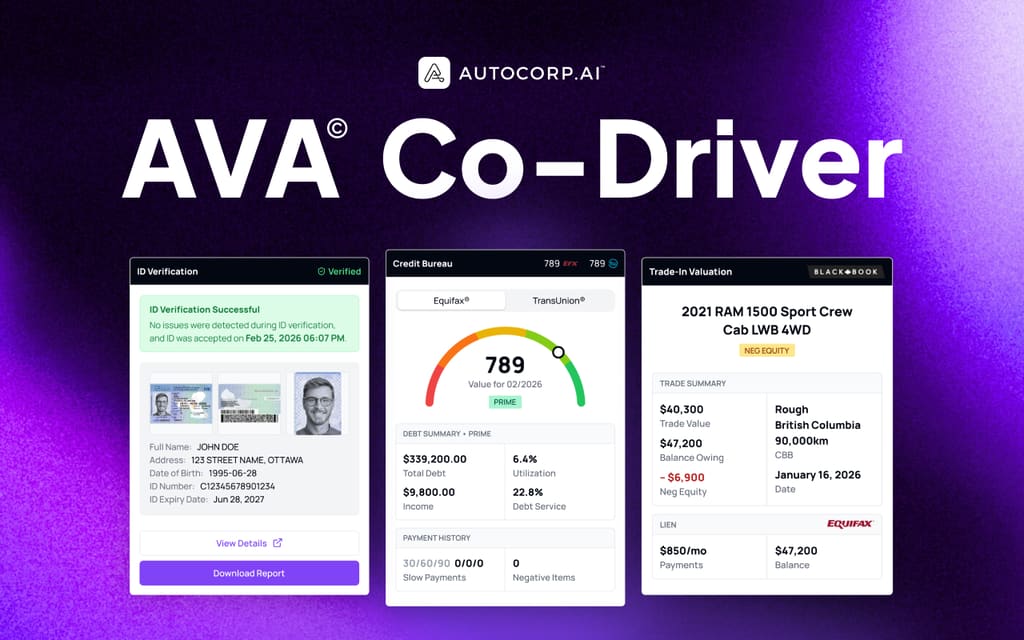


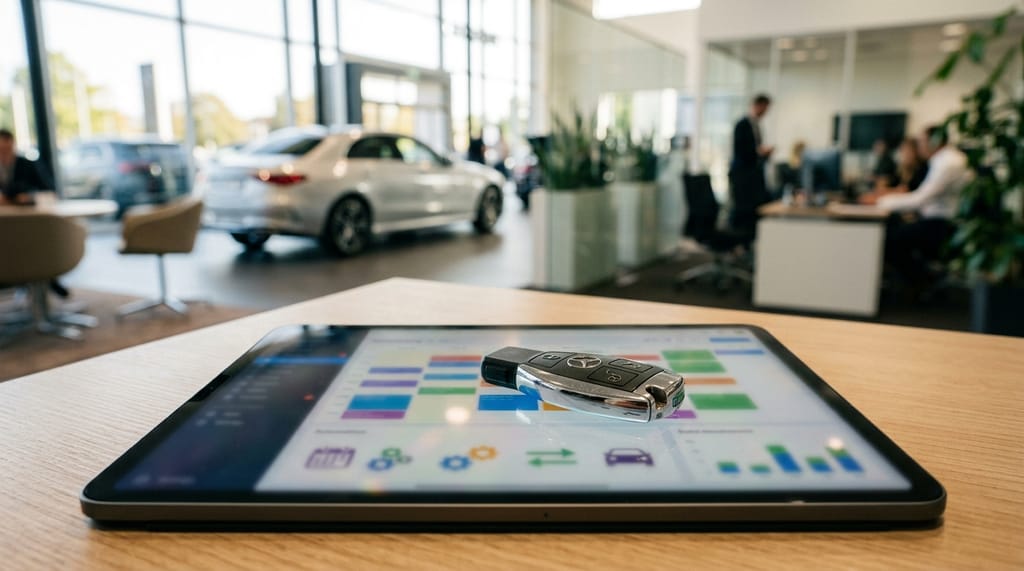
If you run a BDC or sales floor, you already know the math. A rep spends 20 minutes on the phone confirming a test drive, another 15 photocopying a driver's license when the customer walks in, then chases insurance details before handing over the keys. Half the time the customer no-shows. The other half, you find out later the license was expired, or the "customer" wasn't the customer at all.
Automating test drive bookings isn't just about a nicer online form. It's about making sure every person who sits behind the wheel is verified, insured, credit-known, and worth the sales team's time.
In our experience working with dealerships across Canada, there are 4 key factors BDC Managers and Sales Leads need to weigh when picking a system to automate dealership test drive bookings:
1. Verifying the driver before you hand over the keys
A test drive is a $40,000+ asset moving off the lot with someone you may have never met in person. If you can't confirm the driver is who they say they are, and that their license is valid, you're carrying risk your GM does not want on the books. Identity fraud accounts for over 75% of fraudulent applications in Canada and rose 54% year-over-year, which means the person booking online may not match the person showing up at 4pm on a Saturday.
To do that, you need a booking flow that captures a government-issued ID, runs a biometric selfie check for liveness, and parses the license expiry date, all before the appointment lands on your calendar. Not after.
2. Booking that lands directly in the showroom workflow (without a second data entry)
Most dealer sites have some form of "Book a Test Drive" widget. The problem is that widget usually dumps a name and phone number into your CRM, and the sales rep still has to call to collect a driver's license, ask about insurance, and reconfirm the time. That's not automation, that's a lead form with extra steps.
From our experience talking to BDC teams, what reps actually remember is which customers showed up ready: ID in hand, credit already pulled, financing conversation already started. They don't remember the ones who filled out a website form.
A good test drive automation tool should push the booking, the verified ID, and any credit data straight into the lead record, so the rep walking the customer to the vehicle already has the full picture on their tablet.
3. Connecting the test drive to a credit profile (so it's a qualification step, not a joyride)
You've verified the driver. Great. But what if your sales lead asks: "Of the 14 test drives booked for this weekend, which three are most likely to sign paperwork on Monday?"
Most BDC managers pull that list manually, cross-referencing appointment times in one calendar, credit apps in another, and CRM notes in a third. It's tedious, and by the time you're done, the weekend is already over.
A good test drive booking system should connect each appointment to the same customer's soft-pull credit report, trade-in valuation, and ID record, so the test drive becomes the moment you confirm a buyer, not the moment you hope for one.
4. Fraud alerts and monitoring across the whole deal (not just the appointment)
Yes, this post is focused on automating test drive bookings. But a good system should also flag risk after the booking: a mismatched name on the ID, a failed liveness check, negative equity on the trade, or a credit alert that changes the deal shape.
Why? Because a "verified" test drive is only useful if the verification travels with the customer into F&I. Otherwise your finance manager is re-doing the same checks two days later, and any red flag caught at booking gets buried.
You may wonder: "Can't I just handle this with my current CRM and a separate ID app?" You can, but every export and re-key creates a gap where fraud slips through, and the reps stop trusting the data. An all-in-one view means the ID, the license expiry, the credit snapshot, and the appointment are all on the same lead record. No swivel-chair.
After working directly with dealer principals, BDC leads, and sales managers who were losing hours every week to no-shows and manual verification, we built AVA® VeriDrive, the test drive booking module inside the AVA® platform, to handle all four factors above.
Here's how each one works in practice.
Feature 1: Verified Identity Before the Keys Come Off the Hook (Rather Than Photocopying a License at the Desk)
VeriDrive was designed around one principle: no one gets a set of keys until we know who they are.
When a customer books a test drive through your website or an SMS link, they're prompted to upload a photo of their driver's license (front and back) and complete a short biometric selfie. AVA®'s ID module parses the license, checks the expiry date, and runs a liveness check against the selfie, all before the appointment is confirmed on your calendar.
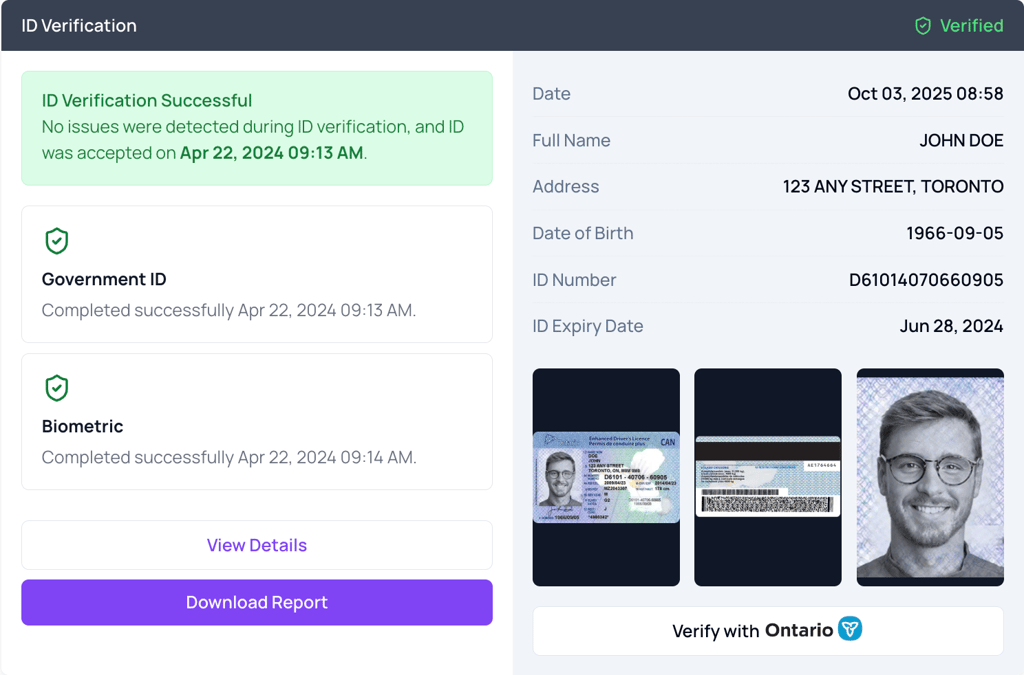
The ID Verification tab inside a lead record. Government ID parsed and verified, biometric selfie confirmed, timestamped, all before the customer shows up.
For example, say a customer books a Saturday 2pm test drive on Friday night. By Saturday morning, your BDC rep opens the lead and sees a green "Verified" badge, the parsed license (name, address, DOB, ID number, expiry date), and a downloadable report that finance can attach to the file later.
That's the simple case. What about the harder one?
Say the name on the booking form is "Jennifer Wilson" but the license uploaded belongs to a "John Doe." VeriDrive doesn't just accept the booking, it flags the mismatch on the lead's ID tab so your team catches it before Jennifer (or whoever shows up) is halfway down the highway in a demo unit.
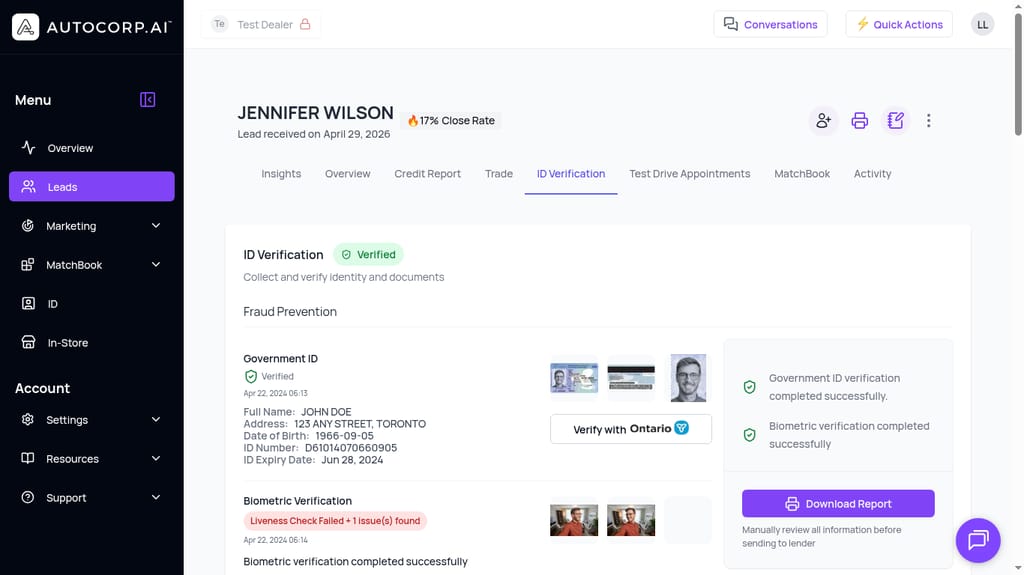
A flagged verification: the lead name and ID name don't match, and the biometric liveness check surfaced an issue. The downloadable report gives your team something concrete to review before the appointment.
For many dealerships, catching this kind of mismatch means the sales manager walks over with a clipboard, asks awkward questions, and often loses 30 to 45 minutes at the desk. In VeriDrive, the flag is on the lead card before the customer arrives, so your rep either resolves it by phone or reschedules, without the awkward showroom moment.
Feature 2: Online Booking That Feeds Straight Into the Lead Record (Saving You 20 Hours a Month of Manual Follow-Up)
AVA® tells you who's ready to buy before your team lifts a finger. See the workflow.
Book a demo →Most dealership websites have a "Book a Test Drive" button. Almost none of them do what a BDC actually needs, which is: capture the booking, verify the driver, and hand the sales floor a complete lead record, without a rep manually re-typing anything.
From our experience running dealer pilots (and from conversations with BDC managers who told us they lose about 20 hours a month to manual follow-up), what teams want is a booking form that answers three questions at a glance:
- Who is booking? Full name, phone, email, plus a verified government ID with a parsed expiry date, not just a self-reported "yeah I have a license."
- What are they booking? Specific vehicle, time slot, and whether they've also submitted a credit application or trade-in on the same visit.
- How ready are they to buy? Is there a credit pull attached? A trade valuation? A close-rate score?
VeriDrive's website form ships with all three built in. You configure it once inside the Website channel of your AVA® portal, copy the link, and drop it on your VDPs, your SMS follow-ups, or a QR code in the showroom.
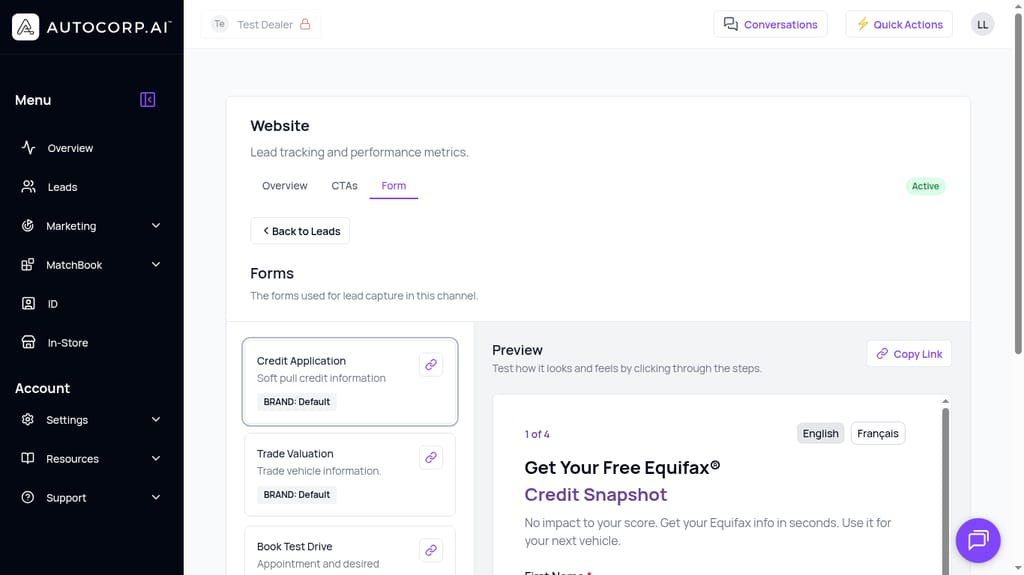
Configure the Book Test Drive form alongside Credit Application and Trade Valuation forms in one place. Preview the flow, copy the link, done.
Each booking that comes through is auto-attached to a lead in the AVA® portal. No import, no CSV. The ID sits on the ID Verification tab. The appointment sits on the Test Drive Appointments tab. The credit snapshot (if the customer also completed one) sits on the Credit Report tab. Your rep opens one screen and has the whole story.
That's the difference between "we have an online booking form" and actually automating test drive bookings.
Feature 3: Connecting Every Test Drive to the Customer's Credit Profile (All Inside AVA®, Without Needing to Use External Tools)
From our experience, most BDC managers are comfortable with the basics above: verified ID, online booking, everything in one lead record.
But what happens when your sales lead walks in Monday morning and asks: "Of the 22 test drives we did this weekend, which ones are lender-ready right now?"
That would normally mean exporting appointments from your calendar, cross-referencing them against your credit CRM, then manually checking who submitted an Equifax soft pull and what their score band is. A half-day of work, minimum.
Inside AVA®, it's already done. Every test drive booked through VeriDrive lives on the same lead record as that customer's soft-pull credit report, their trade-in valuation, and their ID check. You open a single lead and see everything.
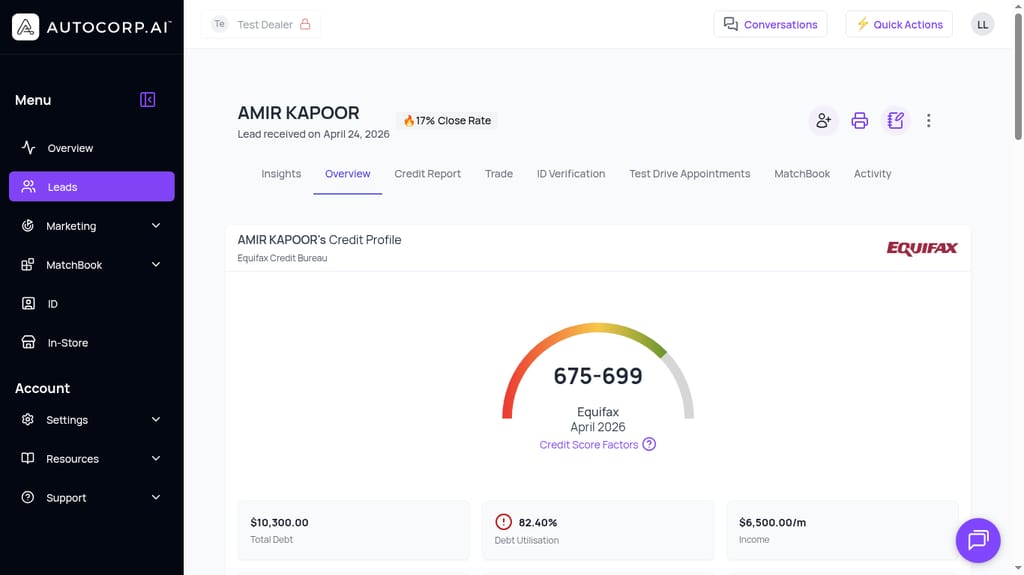
One lead record. Equifax credit score, debt utilisation, income, plus tabs for ID Verification, Test Drive Appointments, Trade, and MatchBook. No swivel-chair between systems.
For example, say a customer named Amir books a test drive on Friday. By the time he walks in Saturday, his record already shows:
- Credit band: 675 to 699 from Equifax
- Debt utilisation: 82.4% (flagged)
- Income: $6,500/month
- ID: Verified, license valid until 2031
- Trade: Estimated value pulled from Canadian Black Book
- Test drive: Confirmed 2pm, 2024 model X
Your sales lead doesn't have to guess whether to spend the hour with Amir or with the next customer over. The answer is on the screen.
This is where "automated test drive booking" stops being a scheduling problem and starts being a lead-prioritization tool. Dealers using this combined workflow have reported lead conversion increases of around 35%, not because more people are booking, but because reps are spending their time on the buyers who are actually ready.
Feature 4: Fraud Alerts and Deal-Level Insights Across the Full Customer Record (Without Needing to Use External Tools)
Yes, you came here to automate test drive bookings. But a good system should also carry the verification and risk signals forward into the rest of the deal.
Why? Because the fraud check you ran at booking is still valuable on Tuesday when the customer sits down with F&I, and the credit alert your BDC saw Friday can save the finance manager a wasted afternoon on Monday.
You may wonder: "Can't my F&I team just re-verify everything when the customer signs?" Sure, but that's the exact duplication we're trying to remove. Every re-verify is a chance for the customer to walk. Every hand-off between tools is a place where the ID document, the license expiry, or the credit alert quietly gets lost.
Inside AVA®, VeriDrive shares the same lead record as AVA® Credit, AVA® Trade, and AVA® MatchBook. That means when a fraud signal, a name mismatch, a failed liveness check, or a negative-equity flag appears, it stays attached to the customer through the entire deal, from the online test drive booking to the finance office.
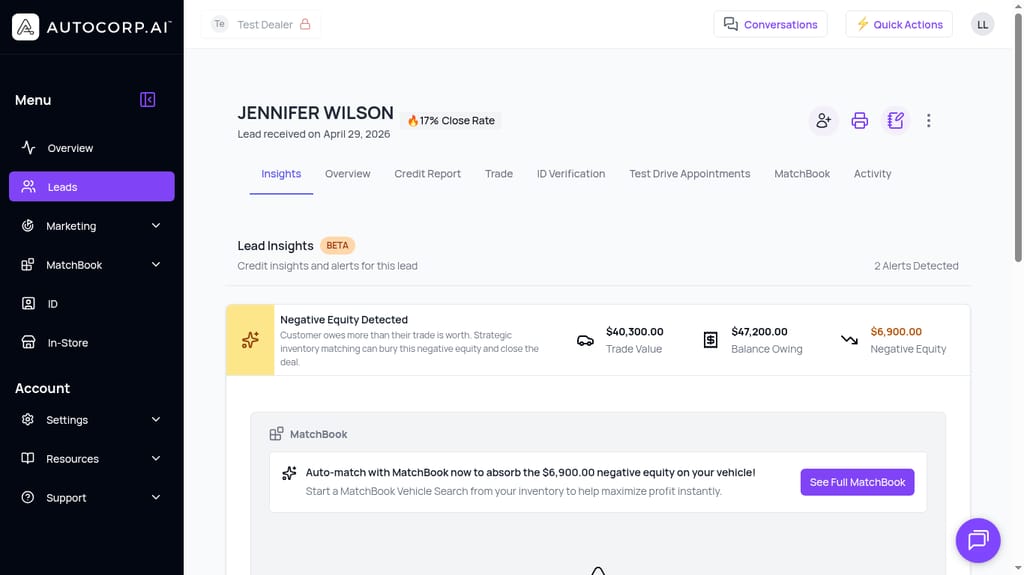
Lead Insights automatically surface deal-level alerts, like $6,900 of negative equity on a trade, right next to the test drive booking, so your team walks in prepared.
In short, VeriDrive isn't a standalone scheduling widget. It's the front door to a lead record that already contains the ID, the credit, the trade, and the alerts your team needs to close, without exporting anything, without a second login, and without asking the customer to re-verify a single thing.
Ready to Automate Test Drive Bookings at Your Dealership?
See AVA® VeriDrive in action and get verified, ID-checked test drive bookings running on your website, with real-time alerts flowing straight into your BDC's lead records.
👉 Book a walkthrough with our team and we'll show you a VeriDrive booking from customer submission to verified appointment in under five minutes.
You can also view pricing and plans or see how AVA® works across the full automotive dealership workflow.