 Activix
  AutoTrader
  Black Book
  CarGurus
  Equifax
  TransUnion


.png)
There is no shortage of SMS tools that promise to automate dealership follow-up, and most of them stop at the same place: a bulk sender that blasts a list, reports a delivery rate, maybe a reply rate, and calls it a day. That's fine if your only KPI is "messages out." It's a problem if your KPI is units sold.
The desk doesn't care how many texts went out last Tuesday. The desk cares whether those texts turned into replies, whether replies turned into appointments, and whether appointments turned into credit apps and delivered cars.
An SMS platform built for a dealership floor should do four things a generic bulk-text tool cannot:
Run high volumes of segmented campaigns without turning your BDC into a copy-paste factory — drafts you can stage, live campaigns you can manage side-by-side, and search and filters that scale to hundreds of active offers.
Route every reply to a human before it goes cold — a shared conversation view, clear ownership, and visibility into the "No Action / Lost" bucket that quietly eats most dealership pipelines.
Report on outcomes the desk actually tracks — leads created, appointments, trades, credit apps, and units sold, not just replies and delivery.
Connect campaigns to credit and identity signals so the offers you send are relevant (equity mining, prequal, matched inventory) instead of generic "come see us this weekend" spam.
You should be looking for those four capabilities when you're evaluating any tool that claims to automate dealership SMS campaigns.
In this article, we'll walk through what that looks like inside AVA® Campaigns — the SMS automation module inside Autocorp.ai's AVA® platform — and then briefly cover how other categories of tools stack up.
Note: AVA® Campaigns was built specifically to fulfill the four capabilities above. You can read the walkthrough below or book a demo if you'd rather see it against your own campaign playbook.
AVA® Campaigns
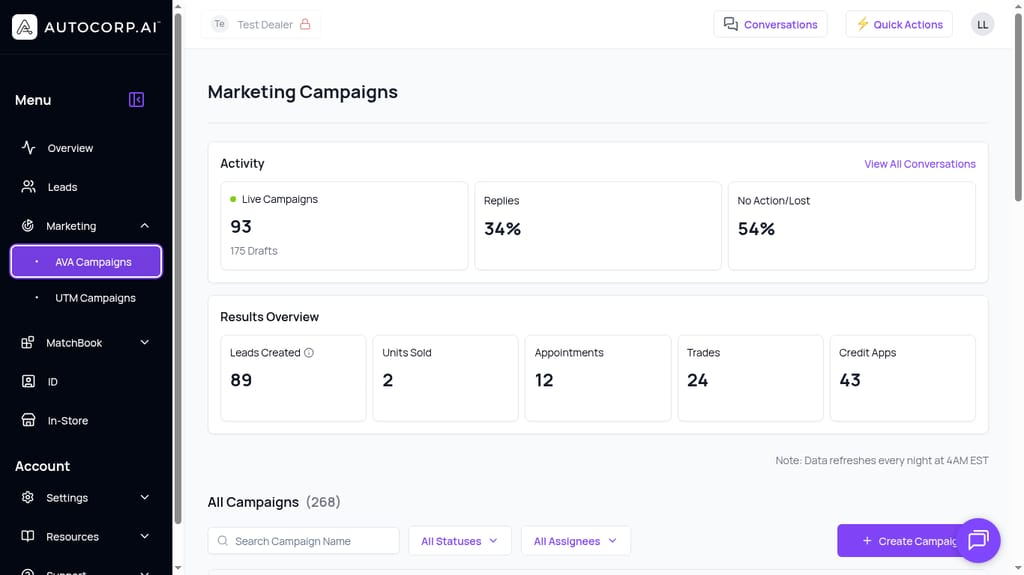
The AVA® Campaigns dashboard: Activity metrics on top (Live Campaigns, Drafts, Replies, No Action/Lost) and Results Overview below (Leads Created, Units Sold, Appointments, Trades, Credit Apps).
AVA® Campaigns is the SMS automation layer inside AVA®. It's built to directly address the four capabilities of an advanced dealership SMS tool listed above:
- Managing campaigns at scale — drafts, live campaigns, status and assignee filters, fast search.
- Turning replies into appointments — shared conversation hub, ownership, and visibility into the No Action / Lost bucket.
- Reporting on desk-level outcomes — leads created, appointments, trades, credit apps, units sold, on a transparent refresh cadence.
- Grounding SMS in credit and identity signals — equity mining, credit-qualified leads, and MatchBook inventory fit.
Below, we'll go through each one in detail.
Managing campaigns at scale without a spreadsheet on the side
Drafts, live campaigns, filters, and search — built for BDCs running dozens of segments in parallel.
Most bulk-SMS tools give you a "campaigns" screen that's really just a list of past sends. When your BDC or marketing manager is running 20+ concurrent segments — a lease-end push, an equity-mining pull, a service-to-sales cross-sell, a new-arrival alert, a subprime re-engagement — that list becomes unmanageable within a month.
AVA® Campaigns treats campaigns as an operational workload, not a mailing history. Every campaign has a status (Draft or Live), an assignee, a name you can search by, and a persistent slot on the dashboard.
From the AVA® Campaigns page, a manager can see how many campaigns are live right now (93 in the screenshot above), how many are staged as drafts (175), and the total in the tenant (268). That means a BDC lead can walk into a Monday standup and answer, in five seconds, "how much are we actually running this week and how much is queued?"
Drafts as a staging area, not an afterthought
Every campaign starts as a draft. That sounds obvious until you realize how many dealerships treat SMS as "write it, hit send." Drafts let a marketing manager build out a monthly cadence — Week 1 equity mining, Week 2 service-to-sales, Week 3 lease maturity — and hand each one off for review or scheduling. You can build the whole month before anyone goes live.
Status filters to separate what needs attention
The Status filter on the All Campaigns list lets you narrow the view to just Drafts or just Live campaigns. When you have 268 campaigns in the account, that's the difference between a productive review and 20 minutes of scrolling. A sales manager doing a Friday audit filters to Live, checks the ones with weak reply rates, and reassigns or pauses them.
Assignee filters for ownership
Every campaign has an assignee. The Assignee filter lets a manager pull up "everything Sarah owns" or "everything unassigned" in one click. This matters because the single biggest killer of SMS ROI at a dealership is unclear ownership — a campaign no one is watching goes live, gets replies, and those replies sit for 48 hours until they're dead.
Fast search by campaign name
Campaigns are searchable by name (e.g., typing "1454" to find campaign 1454). It sounds trivial. It isn't. When a GM walks over and asks "what happened to the March lease-end push?" the BDC manager should be able to find it in three seconds, not three minutes.
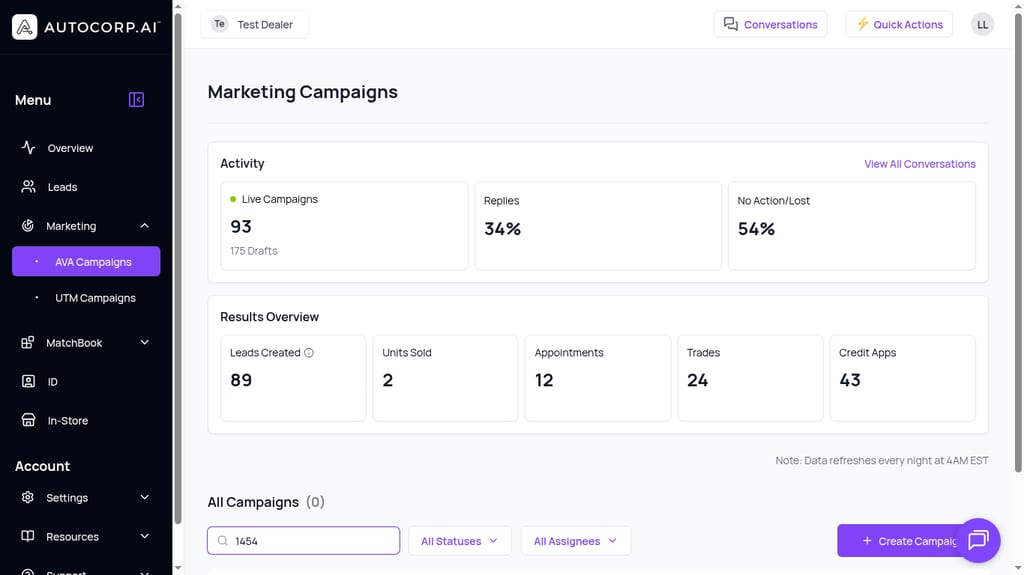
Search by campaign name plus Status and Assignee filters — the three controls a BDC uses every day to find what needs attention.
Create Campaign as a first-class action
The purple "+ Create Campaign" button lives on the bottom-right of the dashboard on every visit. That placement is intentional — creating new campaigns is not a settings-menu task, it's a weekly (sometimes daily) motion for a BDC that's actually operating.
Turning replies into appointments — not letting them die in the No Action / Lost bucket
A shared conversation view and clear ownership so replies get answered while they're warm.
In most bulk-SMS tools, you send the campaign, replies land somewhere (an inbox, a webhook, occasionally a CRM), and a human is supposed to notice. In practice, half of them don't get a response the same day. Once a reply goes cold, the entire economics of that campaign changes — you paid for the send, you got the interest, and you lost the appointment.
AVA® Campaigns puts the reply layer next to the campaign layer so no one can pretend the follow-up isn't part of the job.
On the dashboard, two of the four Activity metrics are conversation-oriented: Replies % and No Action / Lost %. In the example, 34% of recipients replied and 54% ended up in No Action / Lost. Those two numbers together tell you where the operational leak is. A high reply rate with a high No Action / Lost rate isn't a copywriting problem — it's a follow-up problem.
View All Conversations from the campaign dashboard
Right next to the Activity metrics is a "View All Conversations" link. One click takes a manager from "we have a 54% No Action / Lost problem" to the actual threads causing it. That's the loop dealerships need: metric → conversation → action. Not metric → export → complain.
A dedicated Conversations hub
AVA® convertit le trafic de votre site et de vos campagnes en acheteurs avec une réelle intention de crédit. Parcourez-le.
Réserver une démo →Conversations has its own top-nav pill and its own page. It's a searchable inbox of every thread — searchable by name, email, or phone — with campaign context badges on each thread so a rep opening "AnaTest Test" can see it came from "Campaign Apr 23 2026 9:02:34 pm" and pick up the thread with context.
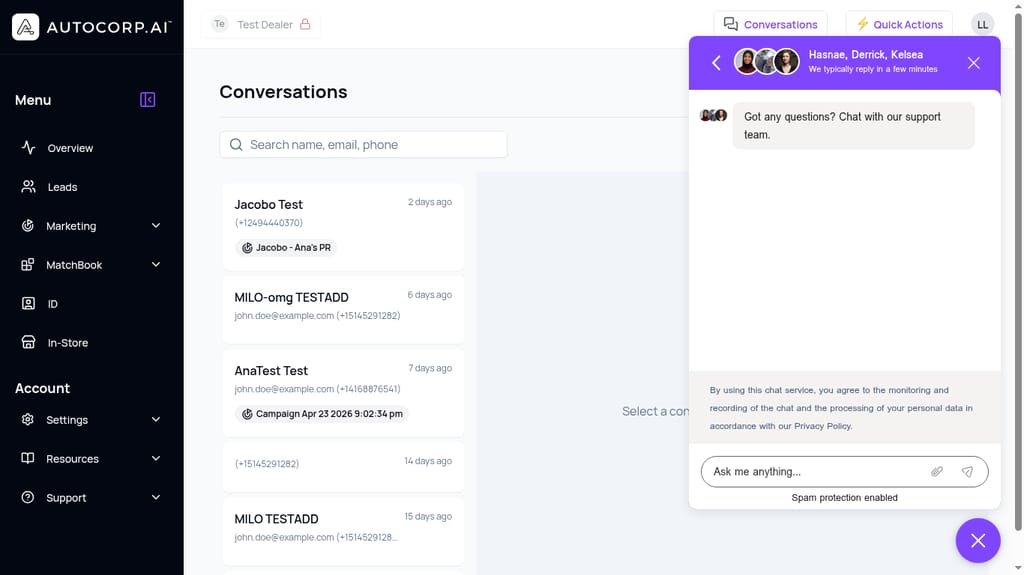
The Conversations hub — every SMS thread with campaign context, searchable by name, email, or phone. This is where replies stop dying.
Ownership at the campaign level and the conversation level
The Assignee field on each campaign is who owns the outbound side; the conversation thread is where that ownership plays out. A sales manager can filter campaigns by assignee, then jump into that person's conversation queue and ask a specific question — "why hasn't the reply from J. Wilson gotten a response since yesterday?" That's the operational accountability piece that generic SMS tools don't have. They give you a delivery report; AVA® gives you a queue you can hold someone to.
Quick Actions from anywhere
The Quick Actions button in the top bar exists so a rep or manager can jump into a new lead, a new conversation, or a campaign action without navigating back to a menu. It's a small thing that adds up when you're running follow-up all day.
Reporting the desk actually trusts — outcomes, not vanity metrics
Leads Created, Appointments, Trades, Credit Apps, Units Sold — with a clear refresh cadence.
The most common objection we hear from BDC and sales managers evaluating SMS tools: "We can't prove ROI." That's usually not because ROI isn't there — it's because the tool only reports on vanity metrics (delivered, opened, replied) and leaves the ROI math to a Monday spreadsheet exercise no one has time to do.
AVA® Campaigns reports on the same outcomes the desk already tracks, on the same page as the campaign list.
The Results Overview block
Every visit to the AVA® Campaigns page loads a Results Overview panel with five outcome KPIs: Leads Created (89 in the example), Units Sold (2), Appointments (12), Trades (24), and Credit Apps (43). These are the numbers a sales manager reports up to a GM. They're not a separate analytics module — they're the top of the SMS page.
That matters because it forces a specific mental model: an SMS campaign is not judged on delivery or replies. It's judged on how many credit apps and appointments it created, and eventually how many cars it sold.
Activity and Results side by side
The dashboard splits the top row into Activity (Live Campaigns, Drafts, Replies %, No Action / Lost %) and Results Overview (the five outcome KPIs). That's the whole funnel on one screen — send → engage → convert. A manager can see in one glance whether the drop-off is in engagement or in conversion, and go fix the right thing.
Transparent refresh cadence
Under the metrics there's a plain-text note: "Data refreshes every night at 4AM EST." That's a small design choice that matters more than it looks. It tells the sales manager what number they're looking at, so no one wastes time asking "is this real time?" or "why doesn't yesterday's app show up yet?" The desk knows the cutoff, works around it, and trusts the number.
Tied to the same lead record
Because AVA® Campaigns lives inside the broader AVA® platform, a lead generated from a campaign flows into the same Leads dashboard your team already uses — with credit tier, trade info, and assignee. So when the Results Overview says "43 Credit Apps," you can drill into who those people are, what tier they're in (Prime, Newcomer, Subprime), and whether they have negative equity on a trade. The campaign metric isn't a dead-end number; it's a lead list.
Grounding SMS in credit and identity signals so campaigns are relevant, not spammy
Equity mining, credit-qualified leads, and MatchBook inventory fit.
The first objection anyone at a dealership raises when you say "automated SMS": "That just spams customers." They're not wrong about the risk. Generic bulk-text tools blast a list because a list is all they have. There's no signal about who on the list is actually in a position to buy, so every message is a coin flip.
AVA® Campaigns is different because it lives on top of AVA®'s credit and identity stack. The message can be triggered by, and personalized around, real fintech signals — which is what turns "spam" into "relevant offer."
Equity mining as a use case, not a metaphor
On the AVA® Growth and Complete plans, AVA® Campaigns supports equity mining — identifying customers who are in a positive equity position on their current vehicle and messaging them with a specific offer. That's not a mass blast. That's "your 2022 RAM has $6,400 of equity, here's what your payment could look like on a 2025." Reply rates on that kind of message look nothing like a generic weekend-sale text, because the customer sees a real reason to reply.
Credit-Qualified Leads (CQLs) as the segment source
The AVA® portal captures leads with a soft Equifax credit pull and (optionally) a trade valuation from Canadian Black Book. Those leads land in the AVA® Leads dashboard with a credit tier and trade context already attached. A campaign can be built off that segment — say, "all Prime leads from the last 30 days who haven't set an appointment" — instead of a raw list of phone numbers.
MatchBook: matching approvals to inventory
For dealers on AVA® Complete, MatchBook connects approved credit profiles to specific vehicles in inventory. The SMS layer can use that match to send an offer that names the actual car the customer is approved on — not a generic "we have vehicles that might fit." That's the difference between a message customers ignore and a message they reply to.
UTM campaigns for source attribution
For dealers who also run paid media, the UTM Campaigns view attributes lead activity back to the source and campaign. So the outcomes on the SMS side (Credit Apps, Appointments) can be reconciled against the paid side, and a marketing manager can actually answer "which source drove which downstream KPI?" instead of guessing.
The net effect: SMS stops being an interruption channel and starts being a relevance channel. The customers you text have a reason to hear from you — equity, prequal status, an approved car — and your reply rate reflects that.
If you're evaluating tools right now, the fastest way to see whether AVA® Campaigns actually fits your BDC workflow is to walk your own segments through it with someone from our team. Book a demo and we'll build a live and a draft campaign against your own data.
See what your next campaign could look like inside AVA®
You should absolutely evaluate more than one option before you sign anything. But when you're comparing, hold every tool to the same four questions:
- Can I run and manage dozens of campaigns without a side spreadsheet?
- Does every reply have a clear owner and a shared view — or is it going to die in an inbox?
- Does the reporting show me the outcomes the desk cares about, not just sends and replies?
- Are my campaigns targeted with real credit, trade, and identity signals — or am I blasting a list?
AVA® Campaigns was built specifically to answer yes to all four. If you'd like to see it against your actual segments and your actual reporting expectations, book a demo and we'll walk through it live.