 Activix
  AutoTrader
  Black Book
  CarGurus
  Equifax
  TransUnion



In our experience working with 650+ dealerships across Canada, there are 4 factors sales and operations managers need to consider when choosing a Canadian Black Book (CBB) valuation workflow for their store:
1. Live, VIN-level Black Book data at the point of the conversation
CBB is the Canadian dealer benchmark for a reason. It reflects real transaction data, wholesale movement, and regional demand week over week. But a Black Book number is only useful if it is current on the day you are quoting the trade. A value pulled last Tuesday, or worse, a PDF someone printed last month, is a number for a car that no longer exists at that price.
To do that, you need CBB values pulled live on the VIN, on the day, with the region and mileage already baked in, so your desk is not doing math on stale data.
2. A valuation range, not a single number, tied to real condition tiers
Black Book publishes wholesale values across X-Clean, Clean, and Average. Most trades land in Clean, not X-Clean, and the gap between those tiers is real money. A single "book value" hides that gap and forces your appraiser to guess.
From our experience running trade desks and talking to used-car managers, sales teams remember the deals they lost on a $2,000 miss on the trade far longer than the deals they won on the front end. A good CBB workflow should show the full wholesale range across condition tiers, apply the regional adjustment automatically, and let the appraiser move within a defined range based on what the car actually is when it lands on the lot.
3. Equity and lien detection built into the same view
Trade value is one number. Equity is the number that actually decides the deal.
But what if your customer says: "I still owe $34,000 on the RAM, what can you actually give me and what does that do to my payment on the new one?" Most dealers export the CBB value, then chase the payout letter for two days, then hand the figure to the desk, then hand it to F&I. By the time the equity picture is clear, the customer has already been to two other stores.
A good CBB workflow should surface the payoff, the market value range, and the resulting positive or negative equity in the same screen your salesperson is already looking at, and it should do it before the first call, not after the deposit.
4. Trade data connected to credit, ID, and inventory in one workflow
Yes, this article is about Black Book values. But a good trade tool should also connect that value to the buyer's credit tier, verified identity, and the vehicles on your lot they can actually be approved on.
Why? Because a $22,000 trade on a 580 subprime buyer with $6,000 negative equity is a completely different deal than a $22,000 trade on a 740 prime buyer. Same trade number, two different desking strategies. If your CBB tool cannot see credit, you are pricing the trade blind to the deal.
Now, you may wonder, can't you just check CBB in one tab and Equifax in another? Yes, but you lose ten minutes per deal, you get discrepancies between tools, and the salesperson has to reconcile three screens on a live call. Consolidating trade, credit, ID, and inventory eliminates the copy-paste and the arguments about which number is right.
After years of building tools with and for Canadian dealers, we built AVA® Trade (part of the AVA® platform) to handle all 4 factors above. It surfaces live Canadian Black Book values, equity, and lien data inside the same lead record where you already have credit and ID.
In this post, we'll walk through how AVA® Trade handles each of these, and how to use the customizable valuation range and "stomach punch" pricing strategically on the desk.
Live Black Book Values Pulled on the VIN (Saving You the Stale-Lookup Problem)
We designed AVA® Trade so the Black Book pull happens the moment a customer submits a trade on your prequal site, and it refreshes on demand from inside the lead record. There is no separate CBB login, no PDF, no "let me check the book and get back to you."
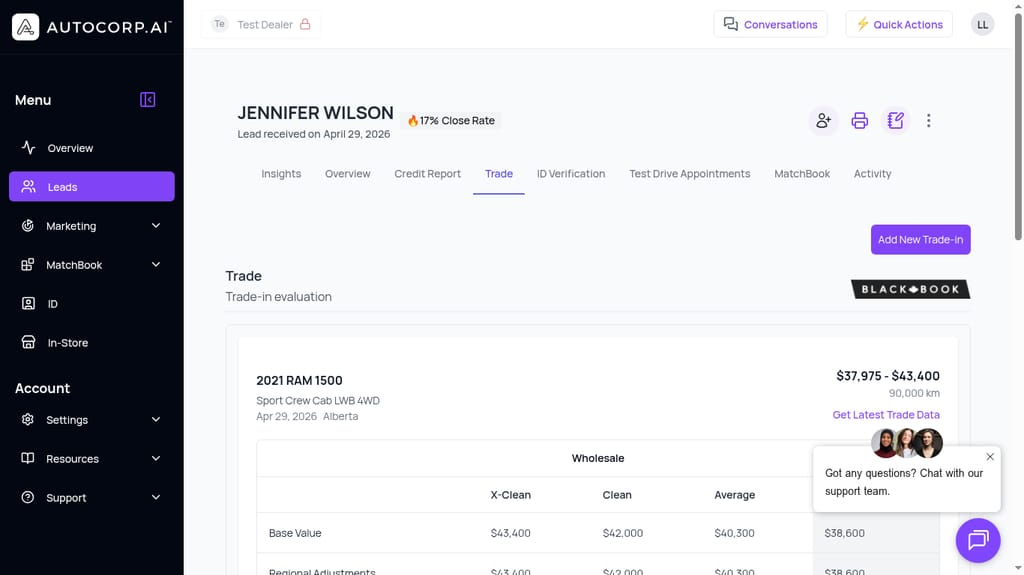
When a lead like Jennifer Wilson comes in with a 2021 RAM 1500 Sport Crew Cab, AVA® Trade already has the VIN, the odometer (90,000 km), and the region (Alberta). It pulls the wholesale valuation range live from Canadian Black Book and displays it on the Trade tab of her lead, next to her credit report and ID verification.
For example, say your used-car manager wants to see today's wholesale on that RAM before the customer walks in for their appointment.
Instead of logging into a separate CBB portal, they open the lead, click the Trade tab, and see the wholesale range ($37,975 to $43,400) with condition tiers laid out. If the number feels stale (because the market moved or the appointment slipped a week), a single click on "Get Latest Trade Data" refreshes the pull.
That is the simple case. But what about the desk that is looking at fifty leads a week and needs to prioritize which trades to touch first?
That is where the Leads list matters. AVA® Trade values roll up into the main Leads view alongside credit tier and equity flags, so a Sales Manager can scan the queue and see, at a glance, which leads have real trade value, which are flagged NEGATIVE EQUITY, and which sit in a PRIME credit band.
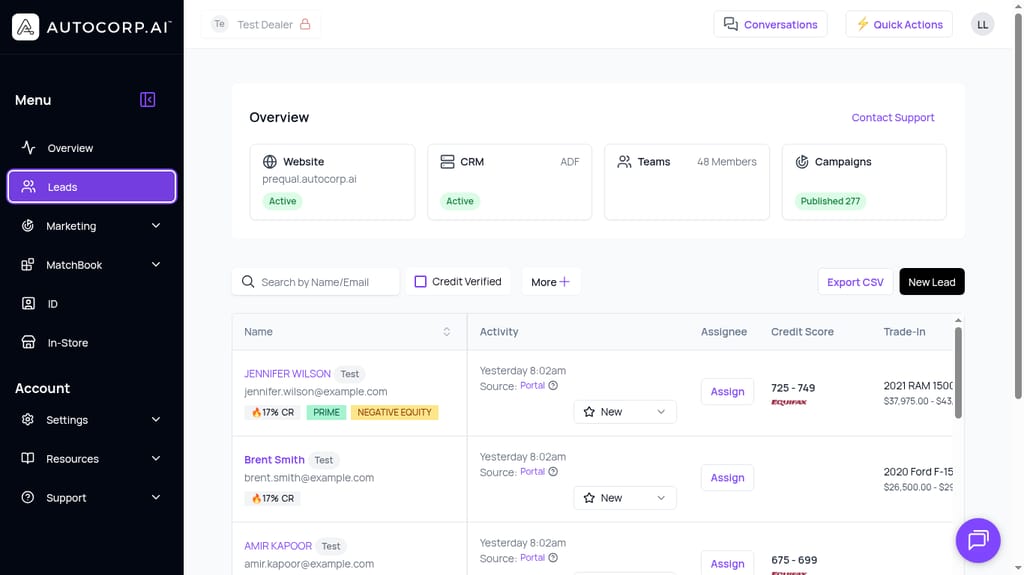
Selecting the right leads to work first takes seconds, not the hour it takes to export a CRM report and cross-reference a book value.
This matters for two reasons. First, your BDC stops burning follow-ups on leads with no equity and no credit. Second, your desk walks into every appointment knowing what the trade is actually worth, in today's market, on this specific VIN.
For many stores, if a Sales Manager asked their team "what's the current wholesale on that RAM 1500 with 90k?", the answer would be "hang on, let me pull it up," followed by a CBB tab, a payoff request, and a fifteen-minute delay while the customer sits in the showroom.
In AVA® Trade, the number is already on the screen when the customer walks in.
The Customizable Valuation Range (Full Wholesale Tiers, Plus Your Own +/- 30% Band)
Here is the thing about a single "book value": it lies to your desk. Trades are not one number. They are a range, and the appraiser's job is to figure out where on that range this specific car actually sits.
Based on hundreds of conversations with used-car managers, we've found that when it comes to CBB, most dealers want the full range visible on the screen so they can answer three questions at a glance:
- What is X-Clean wholesale on this exact VIN, in this region, at this mileage? For the RAM example above, that is $43,400 X-Clean, $42,000 Clean, and roughly $40,000 Average, straight from Black Book.
- What did the regional adjustment do to those numbers? A Ram 1500 in Alberta is not the same car as a Ram 1500 in the GTA, and the Regional Adjustments row in AVA® Trade shows the delta per condition tier.
- Where do we want to open the appraisal, given the actual condition, recon estimate, and how badly we want the unit?
AVA® vous dit qui est prêt à acheter avant même que votre équipe lève le petit doigt. Voyez le flux.
Réserver une démo →Per the screenshot above, AVA® Trade shows the wholesale table with X-Clean, Clean, and Average columns, plus Base Value and Regional Adjustments rows already applied. You are not doing math. You are reading the answer.
On top of the CBB tiers, AVA® Trade lets you set a customizable valuation range of up to +/- 30% around the Black Book number. That range is what your appraiser and desk actually work inside. It gives you room to move for a hot unit, and room to protect gross on a stale one, without ever leaving the Black Book baseline as your defensible reference.
How to use the +/- 30% band strategically: "stomach punch" pricing
"Stomach punch" pricing is an old desk move: open the trade appraisal well below the customer's expectation to reset the anchor, then work back up to a fair number that still protects front and back gross. Done poorly, it costs you the deal and the CSI score. Done with real Black Book data behind it, it is a legitimate negotiation tool.
The +/- 30% band inside AVA® Trade is what makes this repeatable instead of a gut call. Here is the pattern we see work:
- Anchor on the live CBB Clean wholesale number for the VIN, region, and mileage. That is your defensible floor.
- Open the customer conversation at the lower end of your -30% band, backed by specific, honest condition callouts (tires, brakes, panel work, service history gaps). Not a made-up number. A number tied to real deductions from the Clean tier.
- Show the customer the CBB wholesale table on the screen. Transparency is what keeps this from feeling like a punch and starts feeling like a data-backed conversation.
- Walk the number back up as you settle the condition tier honestly, staying inside your band, and land on a figure that still preserves gross plus recon.
Because the whole range is anchored to a live Black Book pull the customer can see, the conversation moves from "why is your offer so low" to "how does this specific unit compare to Clean wholesale in Alberta today." That is the shift that closes trades.
Note that this is just one example of what the range enables. Any appraisal you generate in AVA® Trade can be refreshed, re-pulled after recon, and referenced later inside the deal file.
Equity and Lien Detection Inside the Same Lead (No CRM Tab-Switching)
From our experience, most dealers get the basic Black Book pull right. Where deals fall apart is on the equity math.
But what if your customer asks: "I still owe $34,000, what does that do to my payment on the CX-3?"
That answer used to require a payoff letter, a CBB pull, a calculator, and a finance manager. Two days if the lender is slow. By then, the customer has been to another store.
With AVA® Trade, equity and lien detection are built into the same lead record. Per the AVA® homepage example, when the trade comes in, you see:
- Current Vehicle: 2019 Acura TLX 3.5L SH-AWD
- Trade Value (Black Book): $22,000
- Remaining Balance: $28,000
- Current Payment: $580/month
- Negative Equity: -$6,000
That equity number is flagged directly on the lead in your Leads list (see the NEGATIVE EQUITY badge on Jennifer Wilson's row in the earlier screenshot). Your desk knows before the first call whether this deal needs to be structured around negative equity, or whether there is real cash-in-deal to play with.
For a Sales Manager working a queue, this is the difference between spending 20 hours a month chasing payoff letters and spending those hours on high-intent, positive-equity deals.
Another example: a positive-equity lead who came in through a "Trade Your Car" campaign. The Trade tab shows the wholesale range, the payoff, and the resulting equity in one view, and the record is already tied to the credit report and ID verification tabs on the same lead. Your F&I manager does not need to re-key anything.
Trades like this one give your team the full picture before the appointment. They reduce the "hang on, I need to check with my manager" moments, and they let your BDC book appointments with numbers already on the table.
Note: this is also where AVA® MatchBook picks up. Once equity is known, AVA® MatchBook connects the deal structure to lender-approved inventory on your lot at a payment the customer can actually be approved on. More on that in a moment.
Trade + Credit + ID + Inventory in One Workflow (Without External Tools)
Yes, you came to this article for Canadian Black Book values.
But as we mentioned earlier, a good CBB workflow should also connect that value to the rest of the deal. Credit tier, verified ID, and the vehicles on your lot the buyer can actually be approved on.
Why? Because pricing a trade in isolation ignores the deal it is attached to. A $22,000 trade with $6,000 in negative equity, a 580 subprime score, and a verified ID is a very different desking scenario than the same trade on a 740 prime buyer. Same Black Book number, two different plays.
Now, you may wonder, "can't I just check Canadian Black Book in one browser tab, log into Equifax in another, and eyeball my inventory in a third?"
Yes, you can, but you lose ten minutes per lead on tab-switching, and your numbers drift out of sync every time one tool refreshes and the others don't. That is where the discrepancies come from that kill deals in the box.
With AVA®, the same lead record holds the Black Book valuation range, the Equifax soft-pull credit score and tier, the ID verification, and the AVA® MatchBook view that ties lender approvals to specific units on your lot. No exporting, no reconciling three sources.
For example, in the AVA® MatchBook inventory view below, your team can see specific in-stock units with lender-approved payments, terms, cash prices, frontend profit, and backend room, alongside a running equity chip from the customer's trade (in this case, "Equity -$7,000") so the desk is pricing the front end against the real equity gap on the back end.
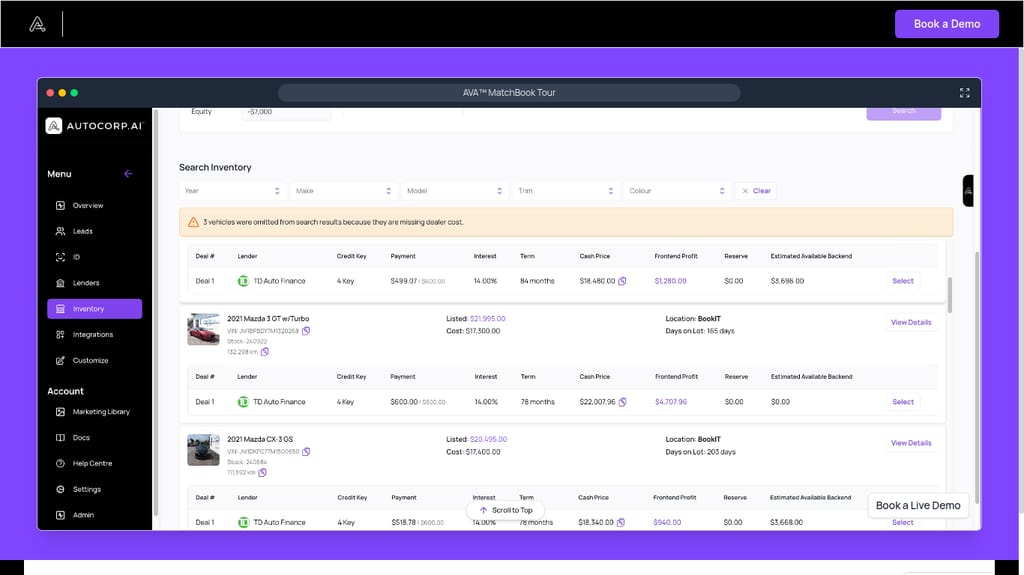
You can then use the Black Book value as another parameter in how you structure the deal, whether that is rolling negative equity into a longer term, moving the customer to a lower-priced unit, or protecting gross on a positive-equity trade.
In short, you can show the customer a complete deal (trade, credit tier, verified identity, matched vehicle, payment) without spending 30 minutes assembling data from CBB, Equifax, Dealertrack, and your DMS.
See AVA® Trade Handle a Real Deal
For more on how AVA® Trade uses live Canadian Black Book data, the customizable valuation range, and equity detection inside the same workflow as credit and ID, book a demo with our team or see the AVA® platform pricing (the Canadian Black Book trade-in tool is included in AVA® Growth and AVA® Complete).